GMDSOFT Tech Letter Vol15.Analyzing Anti-Forensic Traces Left by Location Spoofing Apps

Location information is a vital piece of digital evidence used to map a subject’s movements and validate alibis. Location spoofing apps compromise the integrity of data by hiding real travel routes or fabricating alibis. For instance, there have been cases where suspects used a spoofing app to simulate being away from a crime scene, while simultaneously taking multiple photos to support their false claim.

Such practices fall under anti-forensic techniques, specifically the category of data modification. By altering or fabricating data, location spoofing undermines the reliability of digital evidence and complicates forensic analysis.

This article aims to introduce the main features of three widely used location spoofing apps: Fake GPS Location, GPS Emulator, and Fly GPS. It also explains the types of forensic artifacts that can be recovered during analysis. The findings are based on devices with Android 12, using Fake GPS Location v90.0, GPS Emulator v3.02, and Fly GPS v7 (free versions).

Index


1.Location Spoofing App

A location spoofing app works by feeding the system with fake coordinates generated by the app instead of real GPS signals. As a result, the device appears to be in a different location. This section explains the key features supported by three common spoofing apps: Fake GPS Location, GPS Emulator, and Fly GPS.


To use an installed spoofing app, go to Settings > Developer options > Select mock location app, and assign the app.

1.1 Fake GPS Location

Location Search

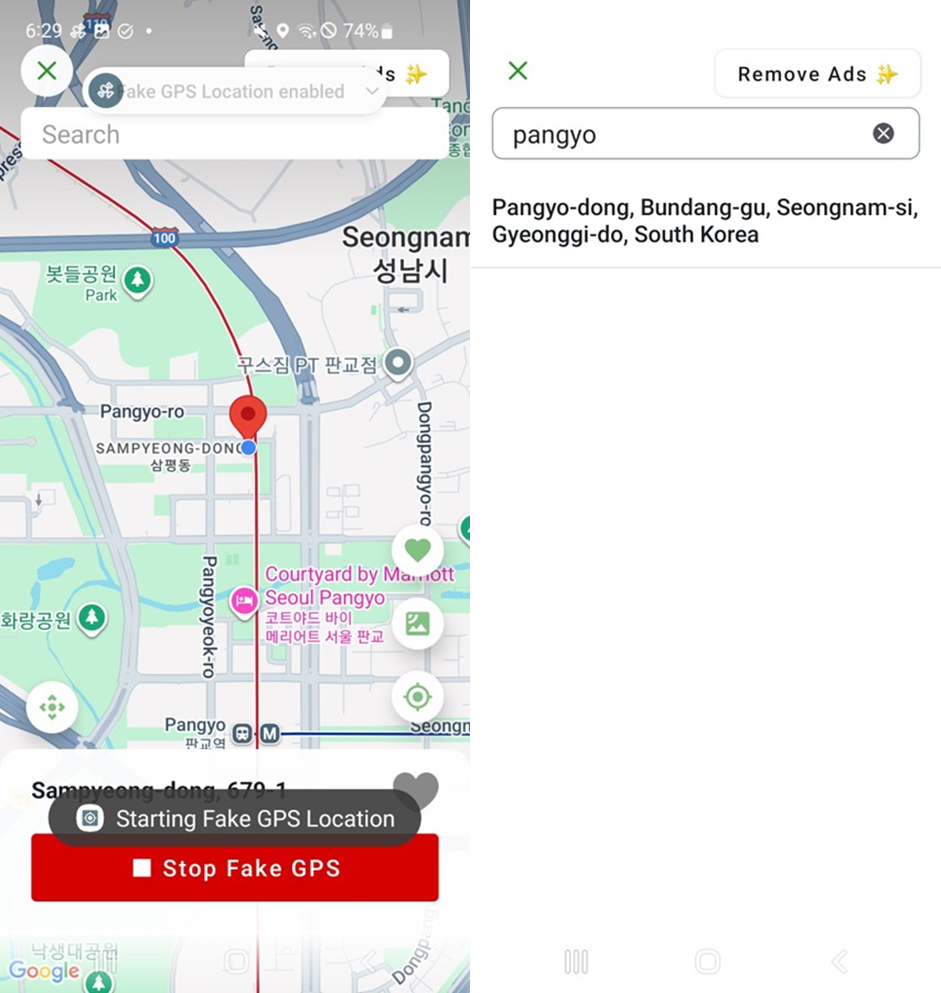
Use the search bar at the top of the screen to enter an address. Once entered, the Save icon icon moves to the corresponding location.
Virtual Location Setup

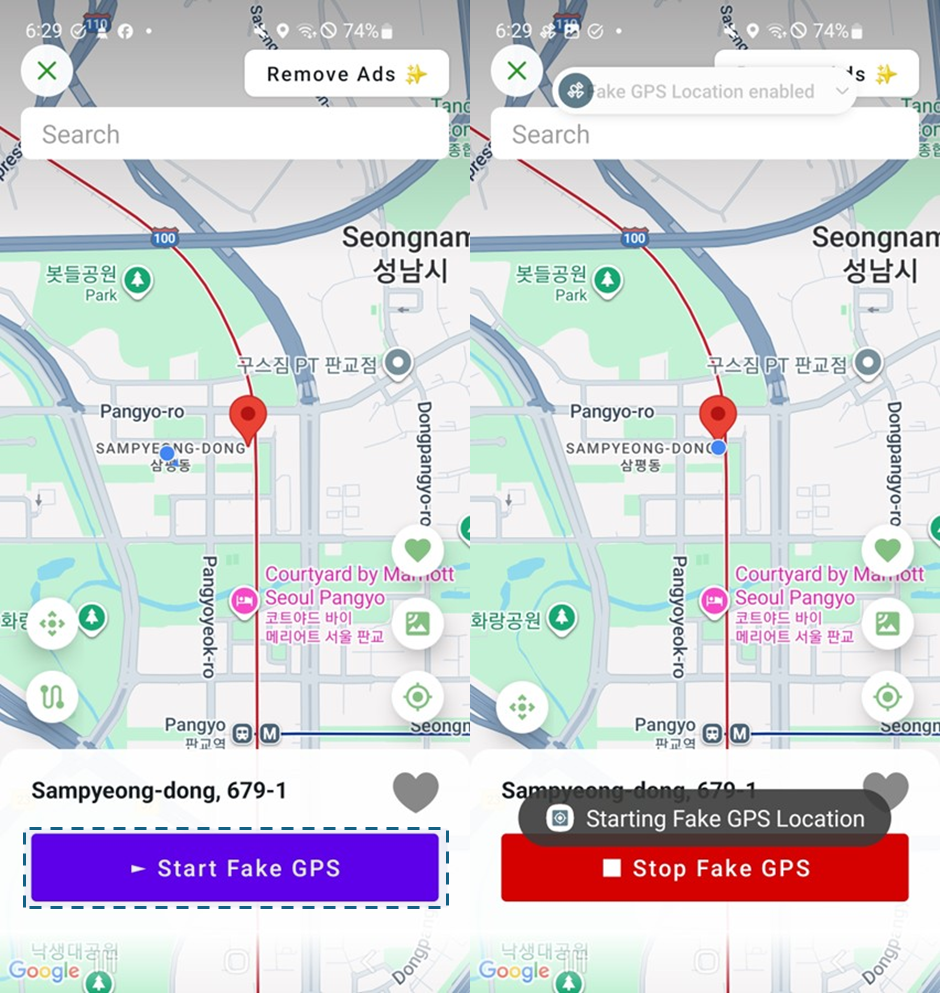
Run the app and swipe across the map to move to the desired location. Tap on the map, and the Save iconmarker will shift to that point. Select [Start Fake GPS] to set the device’s coordinates to the desired location. Fake GPS Location only supports setting a fixed location.

Favorites

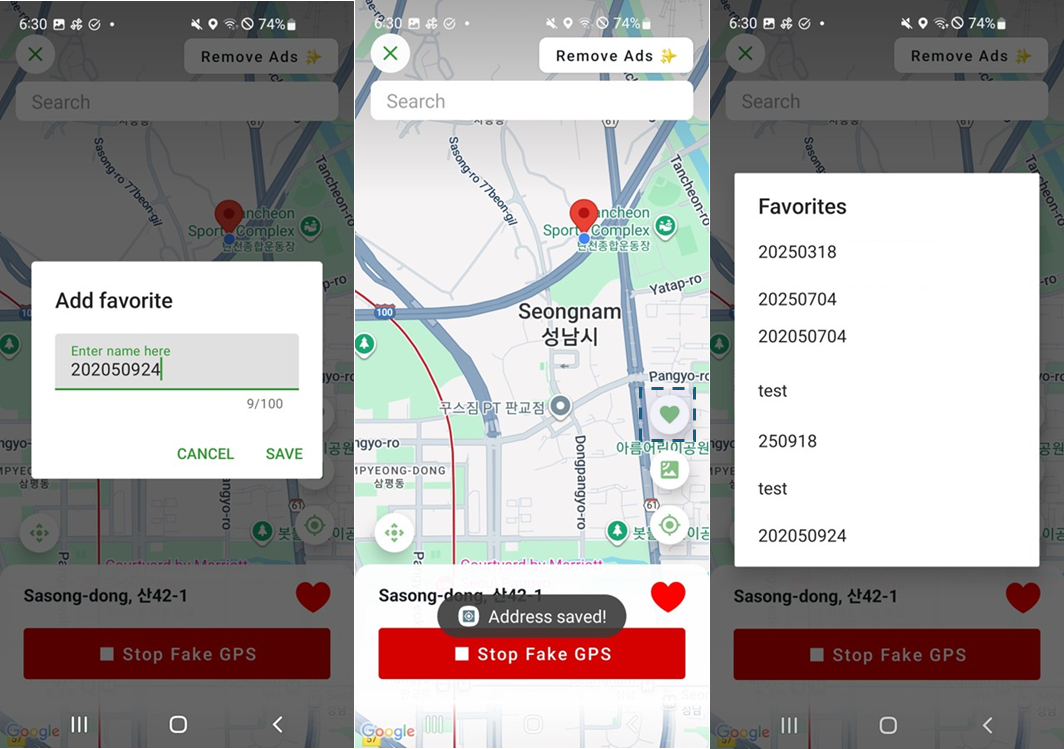
After setting a location, tap the Save iconicon at the bottom-right corner to save it as a favorite. You can view all saved favorites by tapping the Save iconicon. Selecting a favorite will reposition the map to that location. Fake GPS Location does not provide an option to delete saved favorites.


1.2 GPS Emulator

Location Search

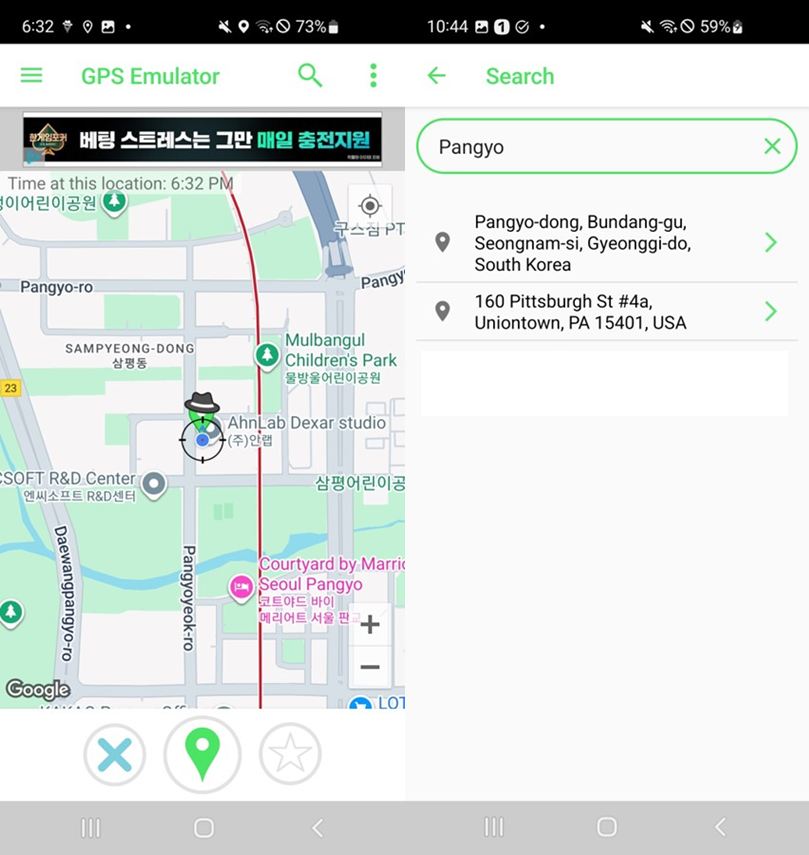
Tap the Save iconicon at the top-right corner and enter an address in the search bar to move to that location.

Virtual Location Setup

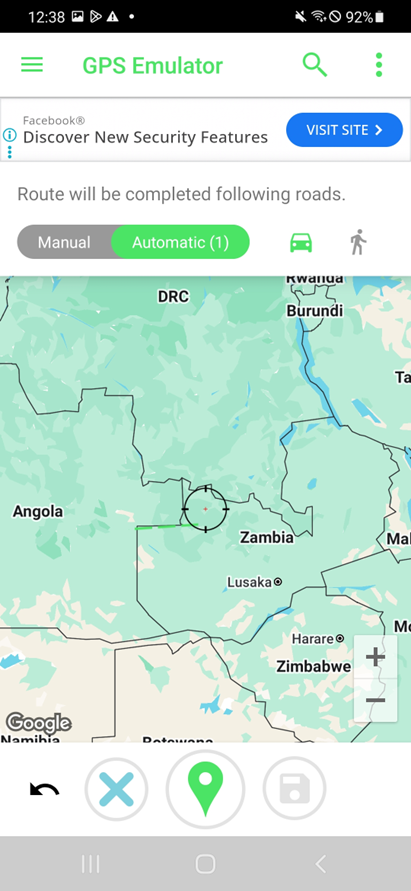
GPS Emulator offers two options, one that allows users to set a fixed virtual location and the other to simulate travel routes.

•Fixed Location: Swipe the map to the desired point and tap the Save iconicon at the bottom of the screen. The Save iconmarker will appear at that point, and the device will use it as the virtual location. Tap the Save iconicon to stop spoofing.

•Movement Path: Select the Save icon
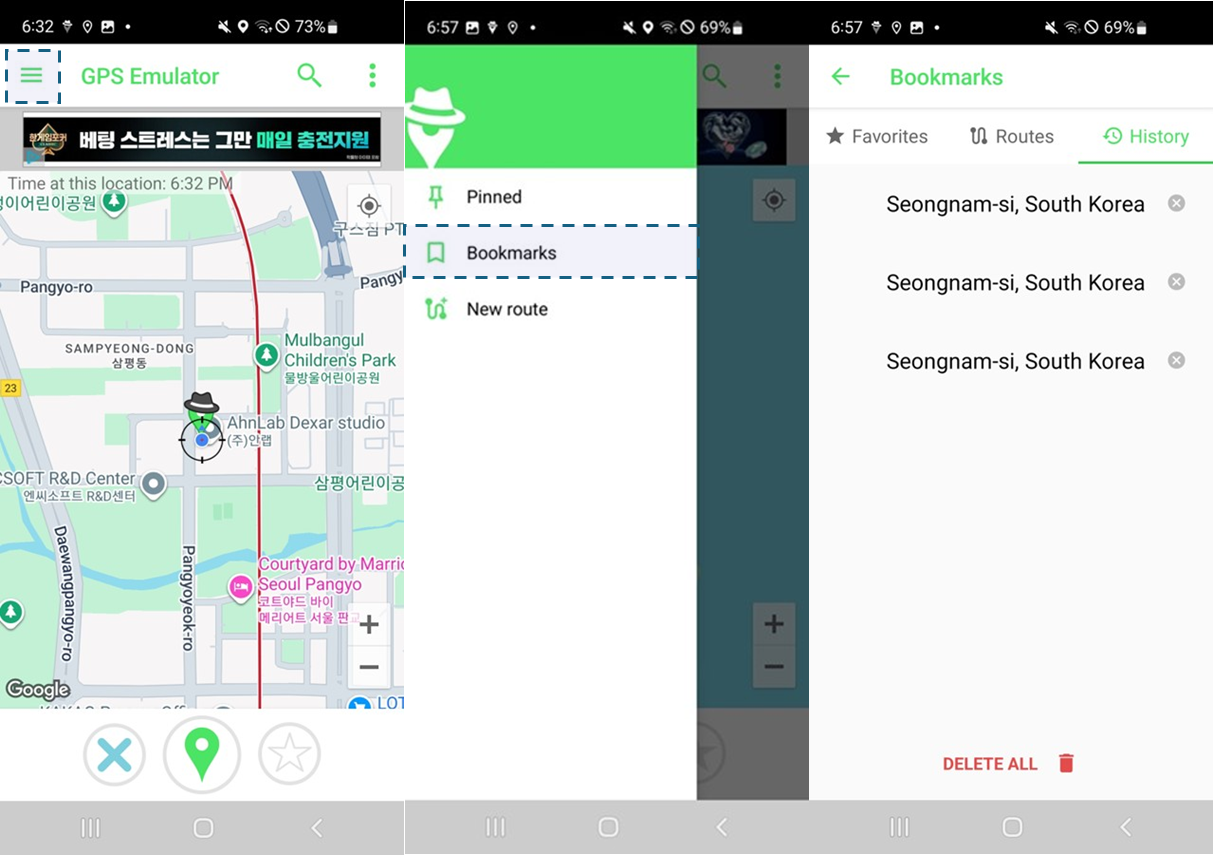
icon at the top-left corner > New route to configure paths manually or automatically.

    ・Manual: Swipe the map to set a start and end point. You can connect the points with a straight line.

    ・ Auto: Generate a path that follows roads or sidewalks, simulating travel routes.

Favorites

Tap the Save iconicon at the bottom-right corner to save a fixed location as a favorite. Go to Save icon
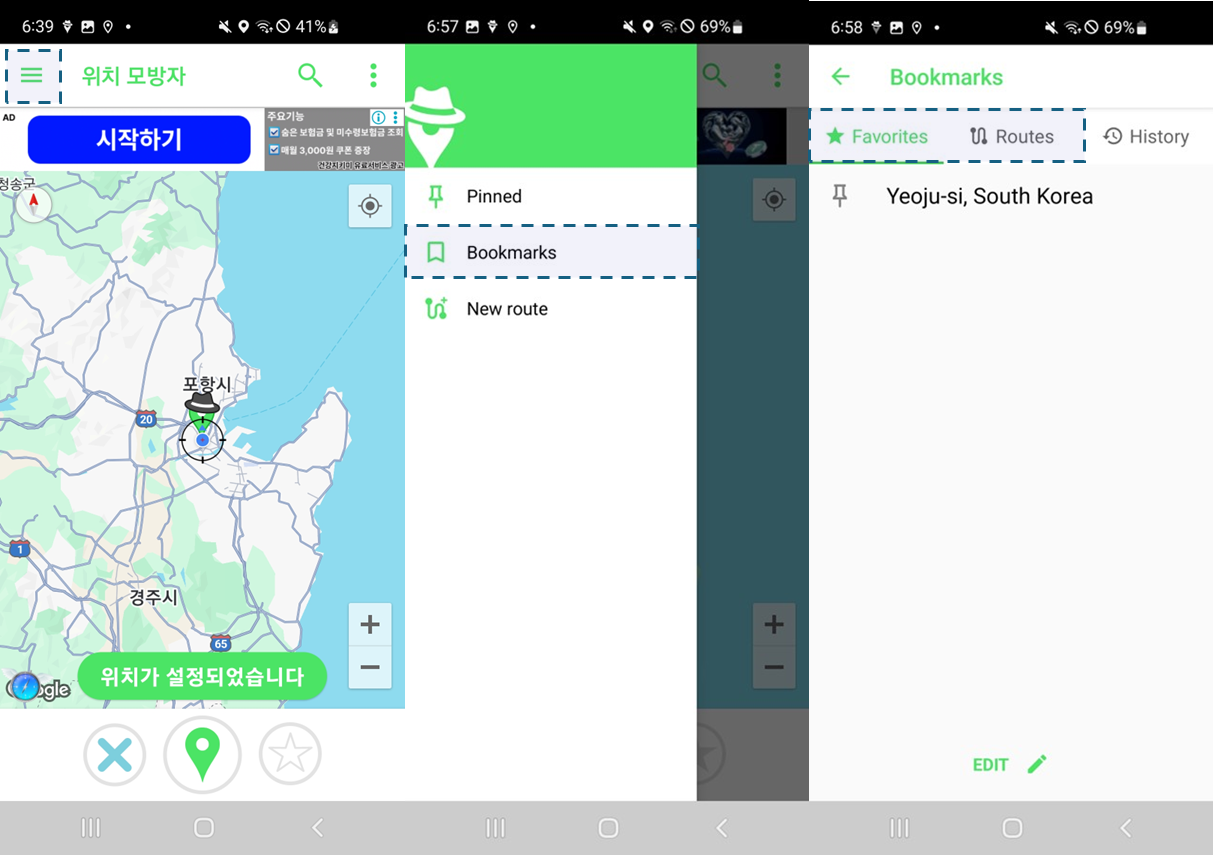
icon at the top-left corner > Bookmarks > Locations & Routes to view the saved favorites.

Location Spoofing History

Go to Save icon icon at the top-left corner > Bookmarks > History to view the records of spoofed locations. Tap the Save iconicon to remove entries from the list.


1.3 Fly GPS

Location Search

Tap the Save iconicon at the top-right corner and enter an address in the search bar to move to that location.
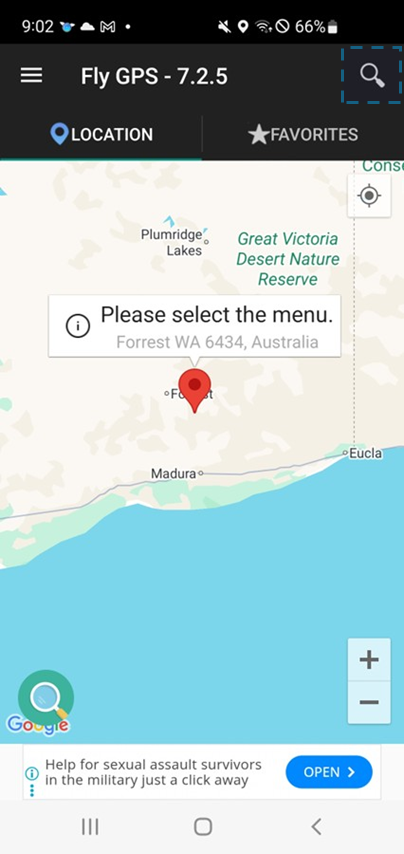
Virtual Location Setup

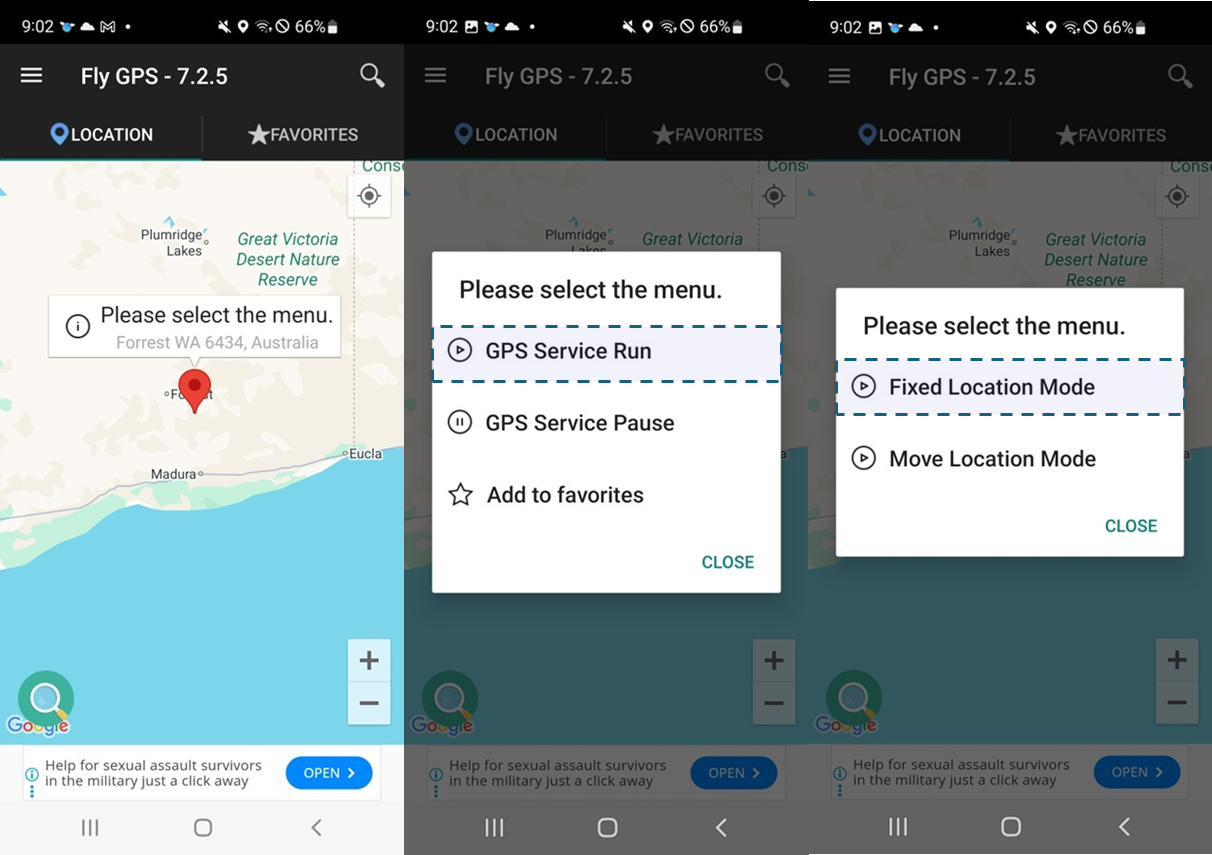
Fly GPS offers two options: Fixed Location Mode for setting a static spot, and Move Location Mode for simulating movement routes as if a user is physically moving.

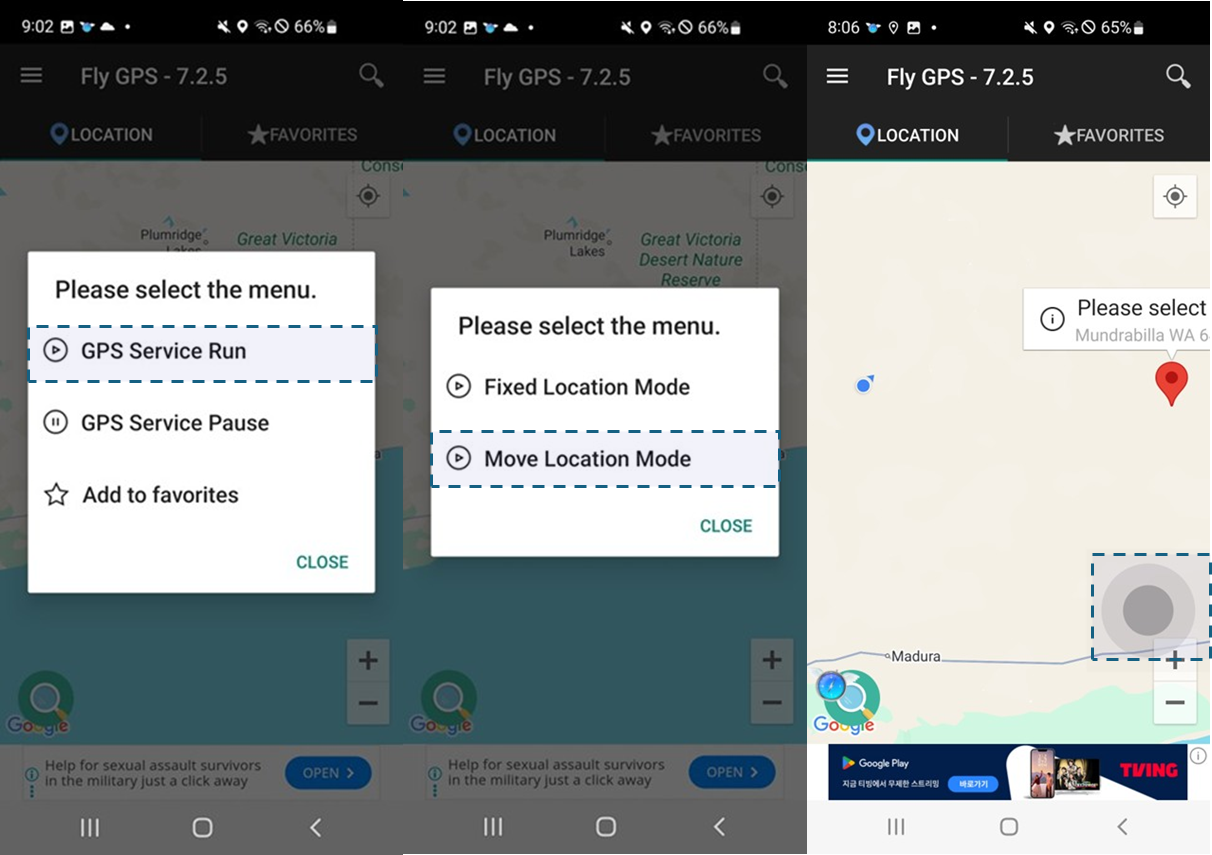
• Fixed Location Mode: Swipe the map and tap the desired location. A marker Save iconwith a popup menu will appear. Select the popup menu > GPS Service Run > Fixed Location Mode to set the virtual coordinates.

• Move Location Mode: Begin by setting a start point the same way as in Fixed Location Mode. Select the popup menu > GPS Service Run > Move Location Mode. Once the start point is set, use the gray directional pad displayed in the bottom-right corner to simulate movement along a path.

Favorites

Select the popup menu > Add to favorites to save the location. Go to Favorites at the top-right of the screen to view the saved favorites. You can reuse the saved items and display them again on the map. Fly GPS support deletion in favorites.

Location Spoofing History

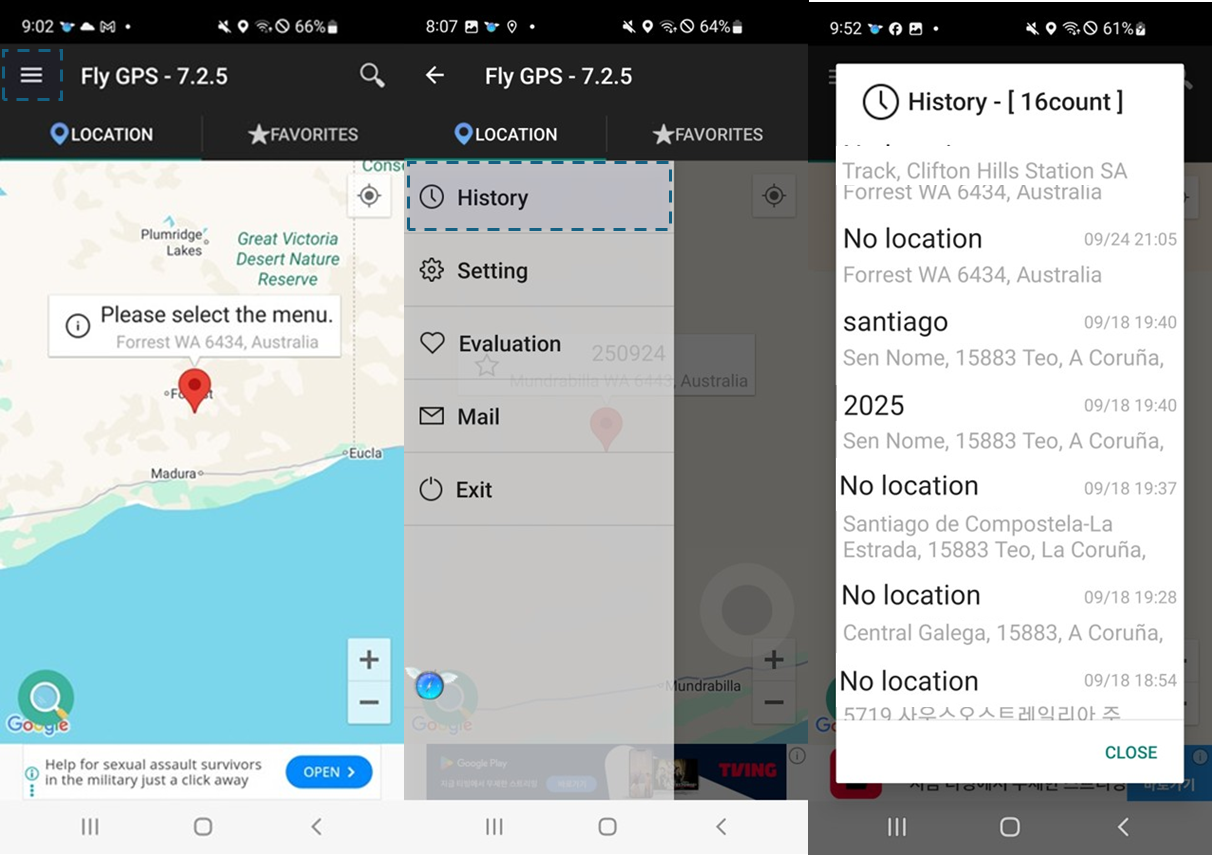
Go to at the top-left corner > History to view the timestamp and location details of spoofed positions. Fly GPS does not support deletion in history.


1.4 Summary of Key Features by App

The main features provided by each app can be summarized as follows:

• Fake GPS Location: In the free version, only location search and favorites are supported. It is limited to setting a single fixed location.

• GPS Emulator: Offers the most comprehensive feature set, including location search, favorites, fixed location, movement path, and location spoofing history. It supports both manual and automatic options (based on roads and sidewalks) for virtual location setup, allowing for more precise manipulation.

• Fly GPS: Supports location search, favorites, fixed location, movement path, and location spoofing history. One distinctive feature is that location spoofing history cannot be deleted, which can provide valuable forensic evidence.

The summary of key features by app can be summarized as follows:

Fake GPS Location GPS Emulator Fly GPS
Location Search O O O
Fixed Location O O O
Movement Path X O O
Location Spoofing History X O O
Favorites O O O

2.Available Information

2.1 Location Search

Location search is a common feature in location spoofing apps. It stores location search history data, which can be used to verify user behavior, such as manually searching for a specific address to change device coordinates. However, location search data is only stored in specific location spoofing apps. Apps like Fake GPS Location and Fly GPS support this feature, but does not retain location search history.

The save paths and target files containing location search data for each app are summarized below.

App Save path Target file
Fake GPS Location Data is not saved
GPS Emulator /data/com.rosteam.gpsemulator/shared_prefs/ com.rosteam.gpsemulator_preferences.xml
Fly GPS Data is not saved

2.2 Location Spoofing History

Location spoofing history records coordinates and related data. GPS Emulator and Fly GPS support this feature. In GPS Emulator, spoofing history can be deleted within the app, removing corresponding entries from the target file. Fly GPS does not support deleting spoofing history, making it valuable for forensic analysis.

The save paths and target files containing location spoofing history data for each app are summarized below.

App Save path Target file Notes
Fake GPS Location Feature is not supported
GPS Emulator /data/com.rosteam.gpsemulator/shared_prefs/ com.rosteam.gpsemulator_preferences.xml If history is deleted from the app, data is also deleted.
Fly GPS /data/com.fly.gps/databases FLYGPS_DATABASE Delete feature is not available

2.3 Movement Route

Location spoofing apps allow users to simulate movements. GPS Emulator and Fly GPS offer this feature. In GPS Emulator, you can manually or automatically manipulate the movement route. In Fly GPS, you can navigate the arrow icons after setting a start point.

The save paths and target files containing movement route data for each app are summarized below.

App Save path Target file Available information
Fake GPS Location Feature is not supported
GPS Emulator /data/com.rosteam.gpsemulator/shared_prefs/ com.rosteam.gpsemulator_preferences.xml Latitude/longitude, speed, fixed/variable status
Fly GPS Data is not saved

2.4 Favorites

Favorites allow you to bookmark frequently used locations for quick access, eliminating the need to repeatedly enter addresses. This feature is supported by all three apps, enabling faster and more convenient spoofing of recurring locations.

The save paths and target files containing favorites data for each app are summarized below.

App Save path Target file Available information
Fake GPS Location /data/com.hopefactory2021.fakegpslocation/files/io.paperdb/ favorites.pt
favorites_coordinates.pt
Name of favorite
Latitude/longitude of favorited item
GPS Emulator /data/com.rosteam.gpsemulator/shared_prefs/ com.rosteam.gpsemulator_preferences.xml
Fly GPS /data/com.fly.gps/databases/ FLYGPS_DATABASE

3. Summary

Location spoofing is an anti-forensic practice that disrupts investigations by concealing or altering digital evidence. It falls under the category of data modification, in which data is manipulated to hinder forensic analysis.

Typical features of location spoofing apps include location search, fixed location spoofing, movement path simulation, and favorites.

All three apps store data when the favorites feature is used.

Among them, GPS Emulator retains the most extensive data, including search records, location spoofing history, and movement paths. Fly GPS is particularly noteworthy because spoofing history cannot be deleted, making it especially useful for forensic analysis.


GMDSOFT Tech Letter Vol14.Data Analysis Using WhatsApp Backup Feature

WhatsApp is one of the most widely used mobile messaging applications globally, with over 2 billion users across 180 countries. It protects user communications with end-to-end encryption to prevent third parties from reading them, and offers convenient features that allow users to automatically backup their data regularly or store end-to-end encrypted backups.

In particular, WhatsApp’s chat backup feature can be used to collect chat data when the app data area is inaccessible on a mobile device. The backup files generated via this chat backup feature are stored in the media area, making them easier to obtain. These files may also contain deleted records by the user, which can serve as crucial evidence in investigations.

This article aims to explain WhatsApp’s built-in backup features, compare the original DB and backup DB, and highlight the available information in the backup file. It is based on data extracted from WhatsApp v2.25.12.74 for Android.


WhatsApp Backup Feature

WhatsApp provides two different methods for backup: the Automatic Backup feature, which generates a chat backup at a specified interval, and the End-to-End Encrypted Backup feature, which applies end-to-end encryption when generating a chat backup.

Automatic Backup

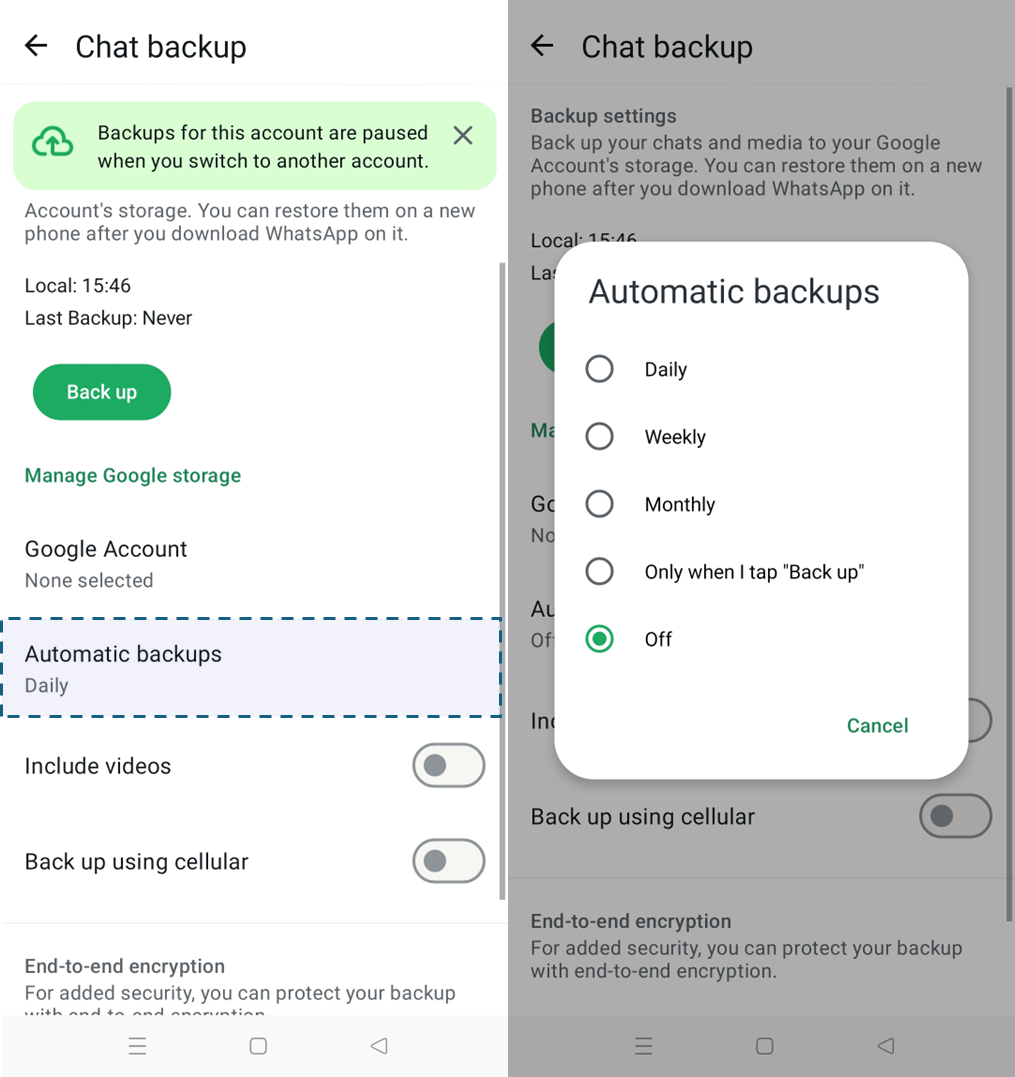
You can select the time interval for backup: daily, weekly, monthly, or only when you tap ‘Automatic backups’ to initiate backup.

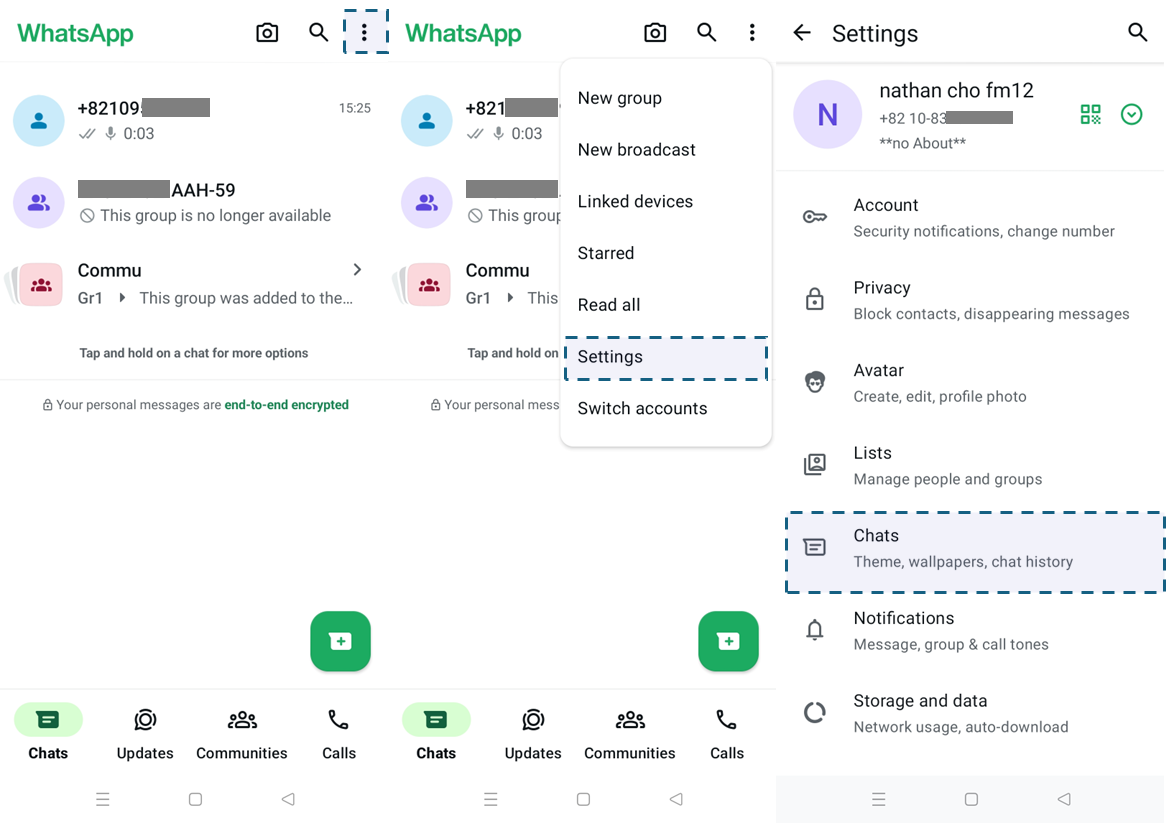
  1. Select the three-dot menu icon and go to ‘Settings’ > ‘Chats’.

  1. Select ‘Automatic backups’ and choose the backup interval.

End-to-End Encrypted Backup

You can create an end-to-end encrypted chat backup.

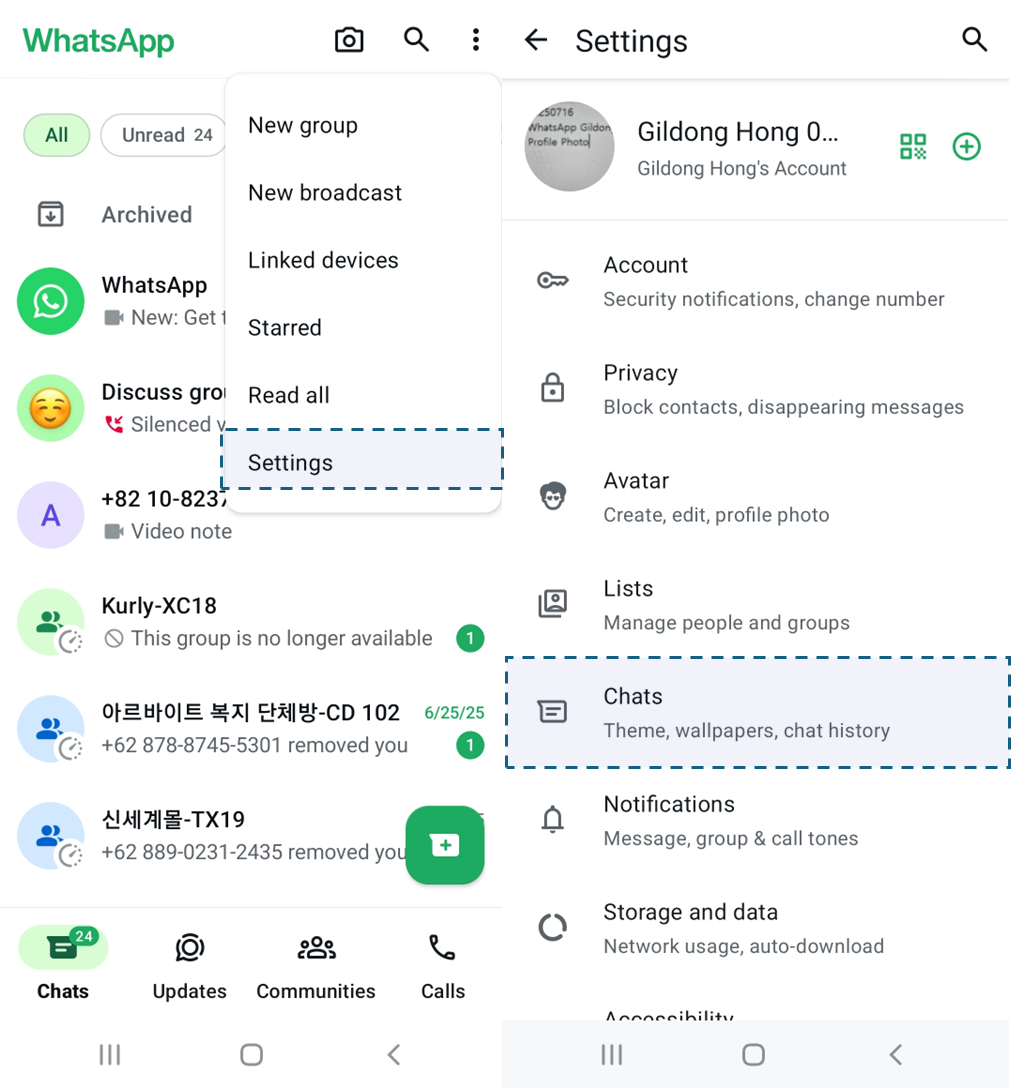
  1. Select three-dot menu icon and go to ‘Settings’ > ‘Chats’.

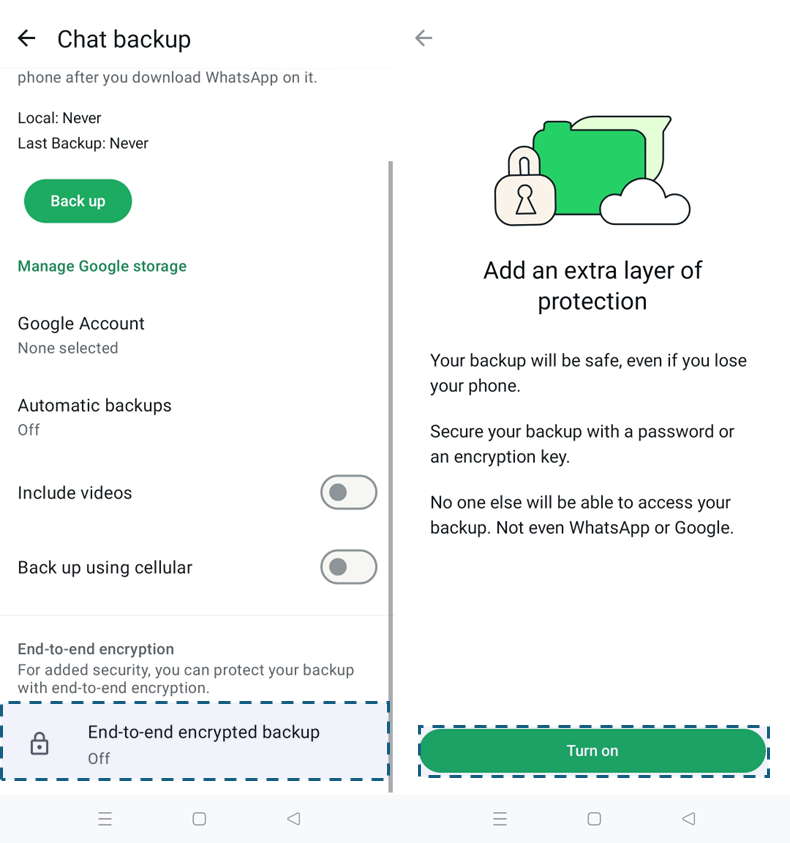
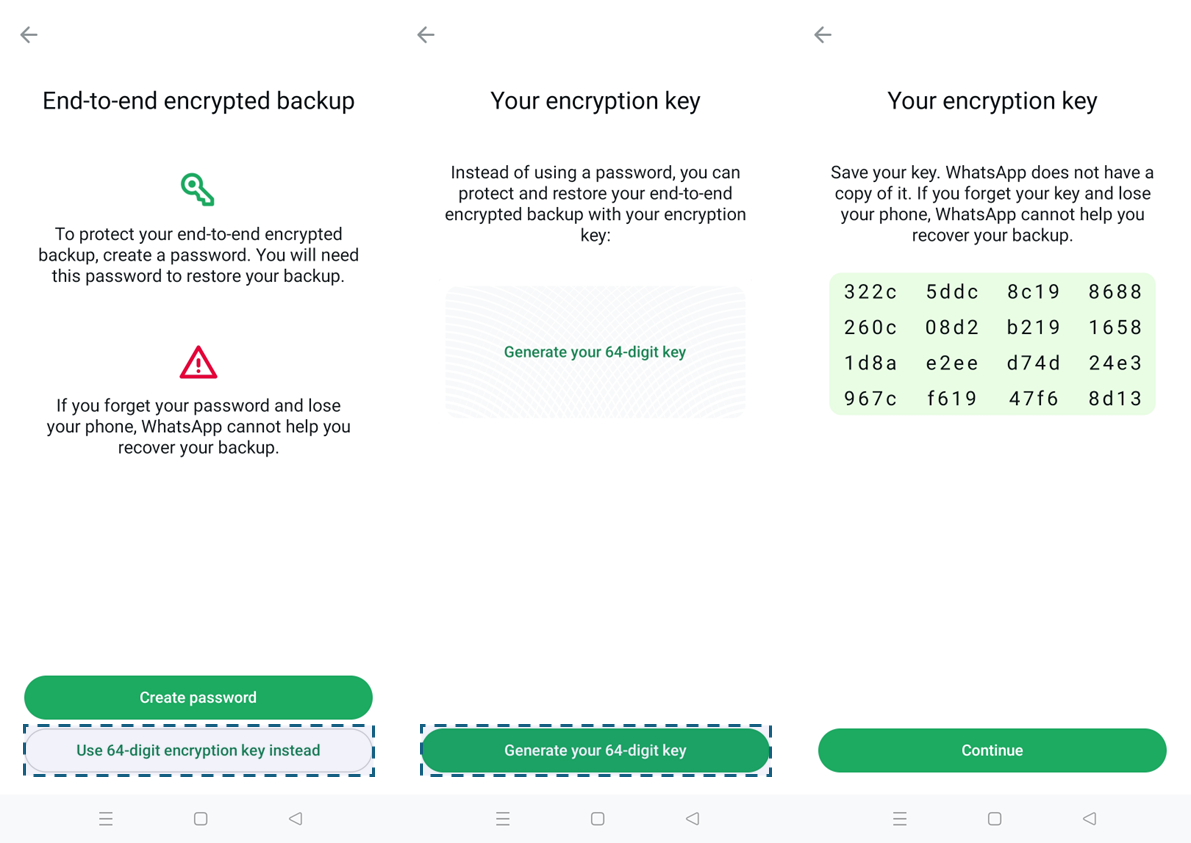
  1. Go to ‘Chat backup’ > ‘End-to-end encrypted backup’ and tap [Turn on].

  1. Tap [Use 64-digit encryption key instead] > [Generate your 64-digit key]. Make sure to save the key securely. Then, tap [Continue].

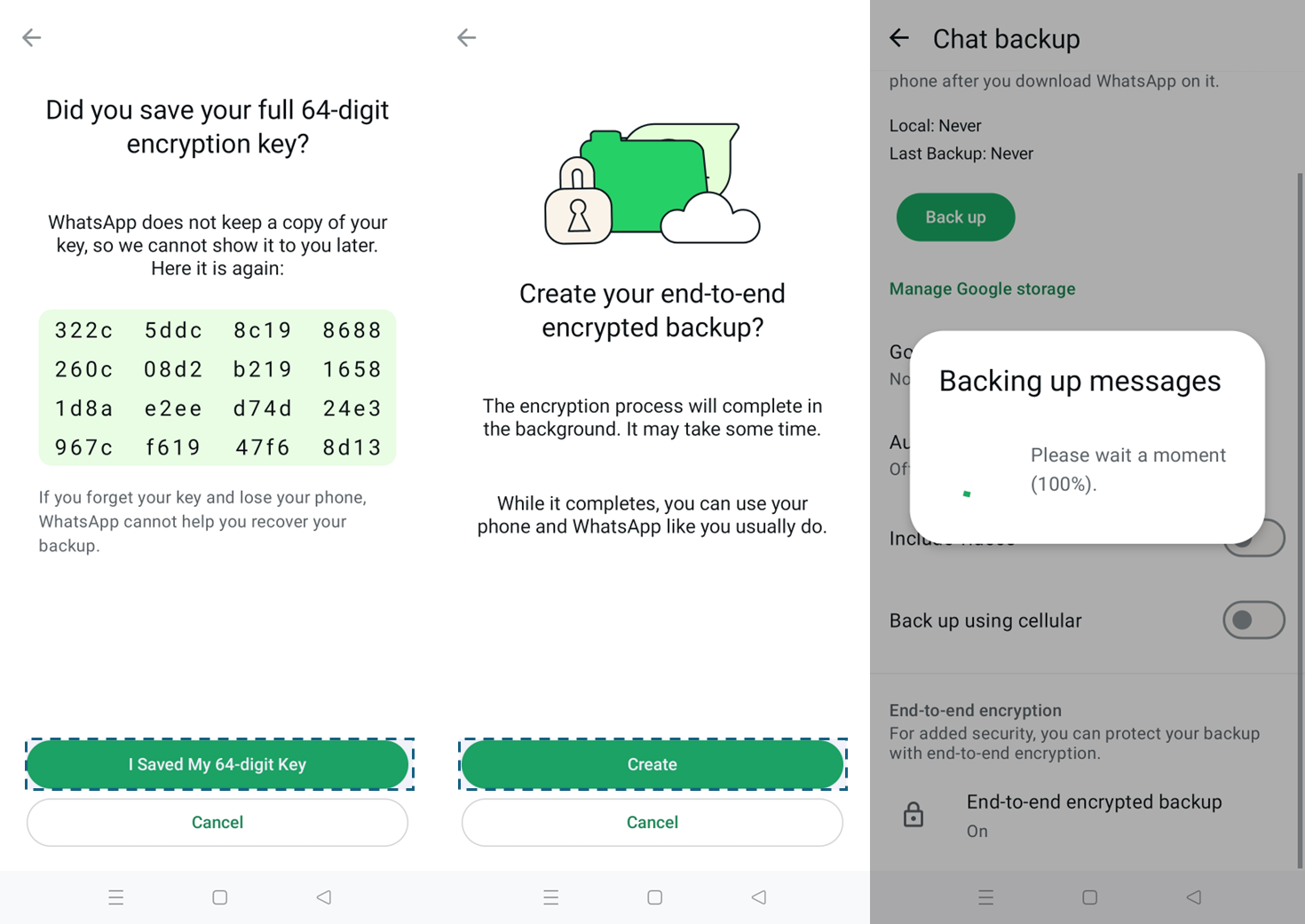
  1. Select [I Saved My 64-digit Key] > [Create] to start the backup process. Wait until the ‘Backing up messages’ progress message disappears.

WhatsApp Chat DB Comparison: Original VS Backup

Backup File and Decryption Key Save Location

WhatsApp stores its backup DB in different formats depending on the selected backup method.

• When using the ‘Automatic backup’ feature, the chat DB are encrypted in .crypt14 format and stored in the media area.

• When using the ‘End-to-end encrypted backup’ feature, the chat DB are encrypted in .crypt15 format and stored in the media area.

• If a user has used WhatsApp multi-account, separate backup files can be created for each account, and a backup DB is generated per each account.

The table below summarizes the information above:

Target Prerequisite DB Save Location (Based on Android 11) Decryption Key Save Location
msgstore.db Chatroom DB saved by default /data/com.whatsapp/databases
msgstore.db.crypt14 Generated upon automatic backup /media/0/Android/media/com.whatsapp/WhatsApp/Databases/ /data/com.whatsapp/files/key
msgstore.db.crypt15 Generated upon end-to-end encrypted backup /media/0/Android/media/com.whatsapp/WhatsApp/Databases/ /data/com.whatsapp/files/encrypted_backup.key
*when multi-account is in use:
/media/0/Android/media/com.whatsapp/WhatsApp/accounts/[number]/Databases/msgstore.db.crypt15
• [number] can be incremented sequentially from 1001.
*when multi-account is in use:
/data/com.whatsapp/accounts/[number]/files/encrypted_backup.key

When a new account is created following multi-account deregistration, the folder name under the ‘account’ folder increases sequentially by 1.

❗️

WhatsApp Multiple Account Feature

When two accounts are registered on the same Android device, you can switch between accounts to use them. Since each account requires verification with a different phone number, this feature is only available on devices with dual SIM support or with a separate phone number. To learn more about the multi-account feature, please refer to the Appendix or WhatsApp official website.

Available Information

You can find the following information in both original DB (msgstore.db) and the backup DB (msgstore.db.crypt15):

• Active records in chatroom

• Deleted records in chatroom (In backup files, some deleted record may not be available.)

The original DB and backup DB have the same structure, with similar retention period and available information. Both active records and deleted records from the original DB can be found in the backup files. However, some deleted records may not be available for analysis as they are automatically cleaned up by the system during the backup process.

Target Available Information Backup storage period End-to-End Encryption
msgstore.db Chatroom and message data Same
msgstore.db.crypt15 Active and deleted records in msgstore.db (Some deleted records may not be found.) O

Summary

  1. WhatsApp backup DB files are stored in the media area, so you can utilize the backup feature to extract WhatsApp data alongside the Full Filesystem and ADB extraction methods.
  2. The ‘End-to-end encrypted backup’ feature generates a backup DB encrypted in .crypt15 format. You can use the 64 keys generated during the backup process to decrypt these files.
  3. You can analyze active and deleted records of the original DB (msgstore.db) in the end-to-end encrypted backup (msgstore.db.crypt15). However, some deleted records may not be available for analysis if they were cleaned up during the backup process.

Appendix

How to Create Multi-Account

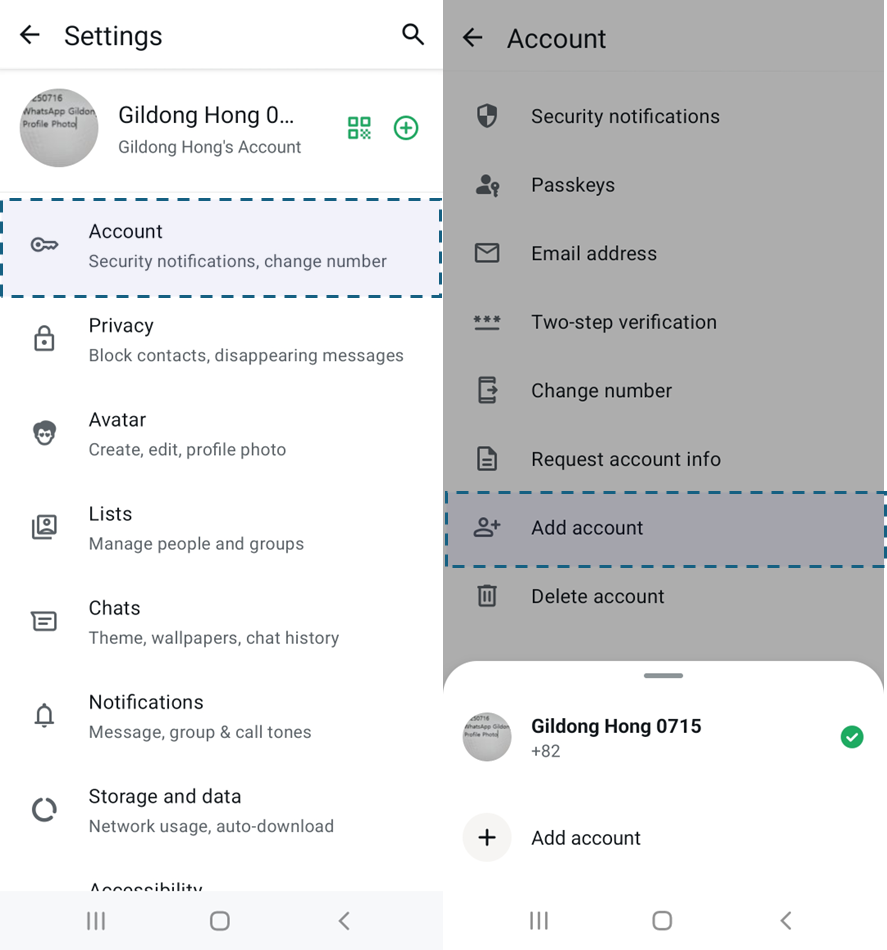
  1. Select three-dot menu icon > ‘Settings’ > ‘Account’ > ‘Add account’.

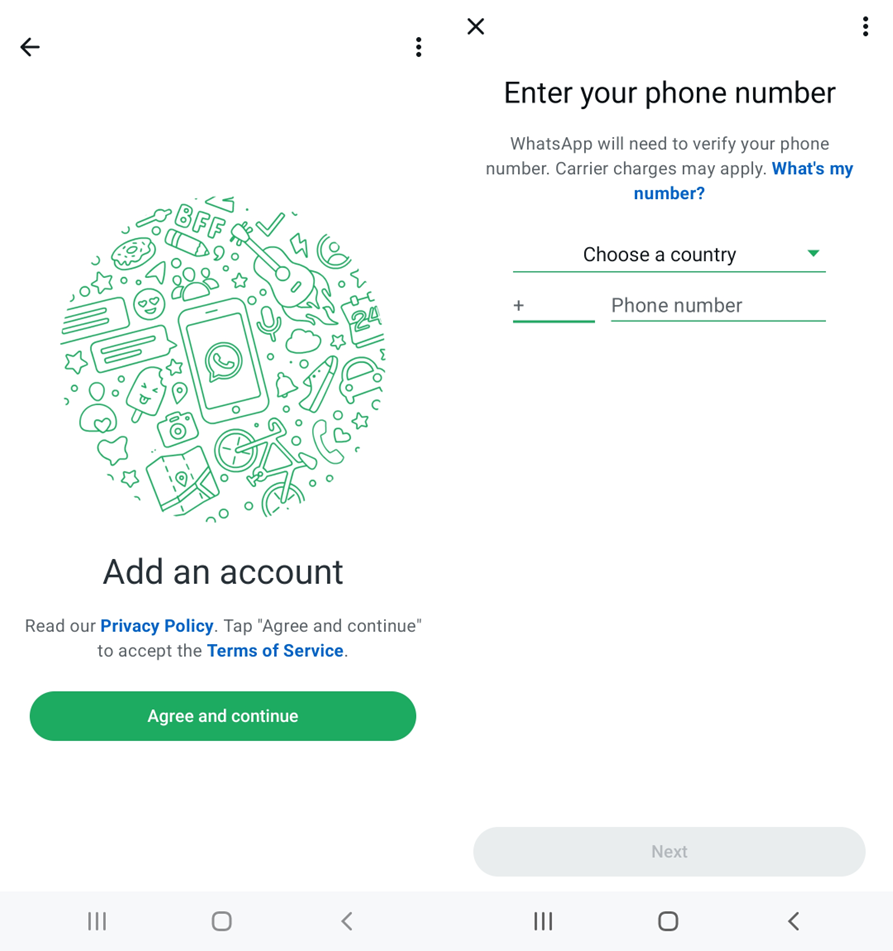
  1. Select [Agree and continue], then enter a different phone number.

  1. Enter the verification code sent via SMS or call, then complete your profile setup.

How to Switch Account

Select three-dot menu icon > ‘Switch accounts’ to switch between accounts. This option is available only when multiple accounts are registered.

For more details, visit the official WhatsApp website.


GMDSOFT Tech Letter Vol13.Smart Ring Artifact Analysis: Oura

In a recent burglary case that made headlines, a suspect confidently claimed he was “fast asleep” during the crime. His defense seemed solid until investigators examined his Oura ring data. The biometric evidence painted a different picture entirely: no sleep patterns were recorded, his heart rate was elevated, and movement tracking data completely dismantled his carefully constructed alibi. 

This case represents a pivotal moment in digital forensics—where wearable technology transforms from personal health tracking into powerful investigative tools. 


The Current State of Digital Forensics: Racing Against Time 

Traditional forensic investigations have long depended on physical evidence and witness testimony to build cases. While these methods remain fundamental, today’s digital investigators face unprecedented challenges. As criminals become more technologically sophisticated and traditional evidence becomes increasingly scarce, forensic teams find themselves in a constant race against time to uncover that crucial piece of proof that can make or break a case. 


The Hidden Goldmine: Biometric Data from Wearable Devices 

Enter the era of ubiquitous wearable technology. Smart rings, fitness trackers, and smartwatches are silently collecting an unprecedented amount of biometric data around the clock. These devices meticulously record: 

• Sleep patterns and quality metrics 

• Heart rate variability throughout the day 

• Body temperature fluctuations 

• Detailed movement and activity tracking 

What makes this data particularly valuable for forensic investigations is its precision and continuity. Unlike smartphones that can be turned off or left behind, wearable devices are typically worn 24/7, creating an uninterrupted timeline of physiological responses that offer crucial insight into a person’s physical state and movements. 

This isn’t merely fitness data anymore—it’s becoming one of the most reliable digital witnesses in modern criminal investigations. 


MD-RED: Your Solution for Biometric Forensic Analysis 

At GMDSOFT, we recognized this growing need in the forensic community. Our MD-RED platform can analyze the biometric goldmine that wearable devices provide. Whether you’re dealing with Oura rings or other wearable technology, MD-RED unlocks the data that solves cases. 

Tech Letter Vol.13 provides an in-depth exploration of analyzing biometric data recorded by Oura smart rings. This comprehensive guide offers the detailed technical insights you need to understand and implement biometric forensic analysis in your investigations. Interested in learning more about biometric forensic analysis and MD-RED’s capabilities? Request our Tech Letter Vol.13 to dive deeper into this cutting-edge field. 


GMDSOFT Tech Letter Vol12.Artifact Analysis Using Telegram Data Exports

The Growing Challenge in Cybercrime Investigations 

The proliferation of encrypted messaging platforms has fundamentally transformed the landscape of digital forensics. Among these platforms, Telegram has emerged as a particularly formidable challenge for law enforcement agencies and investigators worldwide. Its robust end-to-end encryption, coupled with sophisticated data protection mechanisms, has created significant obstacles in extracting crucial digital evidence from mobile devices during investigations.  


Technical Challenges 

Modern cybercrime investigations face unprecedented challenges when attempting to extract Telegram data from smartphones. The platform’s implementation of multiple security layers—including local encryption features—creates a complex forensic environment that traditional mobile extraction tools struggle to navigate effectively. 


Evidence Recovery Limitations 

Even when investigators successfully gain physical access to a suspect’s mobile device, the recovered Telegram data often represents only a fraction of the complete digital footprint. Critical evidence elements frequently remain inaccessible, including: 

• Deleted conversation histories that may contain pivotal investigative leads 

• Group participation records essential for mapping criminal networks 

• Multi-device usage patterns that reveal the scope of criminal operations 

• Account metadata necessary for comprehensive timeline reconstruction  


Transforming Cybercrime Investigation Strategies 

Fortunately, contemporary criminal operations rarely confine themselves to single-device communications. Desktop Telegram applications generate distinct digital artifacts that can provide investigators with previously inaccessible evidence streams through data export functionality.  

GMDSOFT’s MD-RED transforms traditional forensic limitations into investigative opportunities. By leveraging the complementary nature of mobile and desktop digital artifacts, investigators can extract more comprehensive and legally robust evidence profiles. 


Conclusion: The Future of Encrypted Messaging Forensics 

As encrypted messaging platforms continue to evolve and strengthen their security implementations, the forensic community must adapt with equally sophisticated investigative methodologies. Multi-platform analysis capabilities represent more than just a technical advancement, but a fundamental evolution in how digital evidence is conceptualized and recovered.  

MD-RED exemplifies this evolution, providing law enforcement agencies with the tools necessary to navigate the complex landscape of modern encrypted communications. By transforming investigative dead ends into actionable intelligence pathways, these advanced forensic capabilities ensure that the pursuit of justice keeps pace with technological advancement. 

If you want to learn more about Telegram desktop data exports, request the full tech letter! 


GMDSOFT Tech Letter Vol11.Artifact Analysis Using Instagram Data Exports

The Growing Threat Landscape 

With over 2 billion monthly active users worldwide, Instagram has evolved far beyond a simple photo-sharing platform. It has become a primary communication channel—and unfortunately, a hunting ground for sophisticated cybercriminals. From elaborate romance scams targeting vulnerable seniors in the UK to organized cyberstalking networks terrorizing college campuses across the United States, criminals are increasingly exploiting Instagram’s Direct Message feature to execute complex, long-term schemes.  


The Technical Challenge: DM Storage Architecture 

Instagram’s current architecture presents a significant limitation for forensic investigators. The platform implements a rolling storage mechanism that retains only the most recent 20 Direct Messages per conversation thread in standard device analysis scenarios.  


Technical Solution: Leveraging Data Export Functionality 

Instagram’s “Download your information” feature provides a comprehensive alternative data acquisition method. This functionality generates complete archives containing: 

• Full conversation histories without the 20-message limitation 

• Comprehensive account details and profile information 

• Complete media upload records including posts and reels 

• Detailed timestamp data for temporal analysis 

• Cross-platform activity logs from both Android, iOS, and web environments 


Advanced Analysis with MD-RED 

At GMDSOFT, we’ve developed specialized capabilities within our MD-RED to analyze Instagram export data from both Android and iOS devices. Our solution bridges the gap between Instagram’s data export functionality and the practical needs of forensic investigators. 


Real-World Impact 

The difference between standard analysis and comprehensive Instagram data examination can be case-changing. Investigations that previously hit dead ends due to limited message visibility now have access to complete criminal communication records.  


Conclusion 

As social media platforms continue to evolve their data retention policies and technical architectures, forensic investigators must adapt their methodological approaches accordingly. The combination of Instagram’s data export functionality with specialized analysis tools like MD-RED provides a robust solution for overcoming current platform limitations. This approach not only addresses immediate investigative needs but also establishes a framework for comprehensive social media forensics that can adapt to future platform changes and emerging criminal methodologies.  

Tech Letter Vol.11 provides detailed, step-by-step guidance on implementing Instagram DM analysis in your forensic workflow, including best practices for data export and analysis techniques. If you want to learn more about Instagram DM analysis, request the full tech letter! 


GMDSOFT Tech Letter vol 10. Artifact Analysis of Google Maps Timeline

The Evolution of Google Maps Timeline as Forensic Evidence 

Google maps timeline has established itself as one of valuable data sources in digital forensic investigations since its launch in 2015. This powerful feature meticulously records a user’s location history, providing investigators with precise coordinates and timestamps that can place individuals at specific locations with remarkable accuracy. 

For years, forensic experts have relied on this data to reconstruct event sequences, establish or refute alibis, and map suspect movements in criminal investigations. The data’s strength lies in its passive collection methodology—Google captures location information whenever a Google service is activated on a device, even while the device is idle. This creates a comprehensive digital footprint spanning months or even years of user activity. 


A Significant Policy Shift 

In December 2023, Google implemented a significant policy change regarding location history storage and access that has substantially impacted forensic investigations. Previously, investigators could export timeline data through desktop browsers, allowing for streamlined analysis and integration with forensic tools. However, Google’s new policy restricts Timeline exports exclusively to mobile devices. 


GMDSOFT’s MD-RED: Adapting to the New Reality 

In response to Google’s policy changes, GMDSOFT has enhanced its mobile device evidence analysis program, MD-RED, to efficiently process timeline data exported from both Android and iOS devices. This specialized solution addresses the new challenges faced by investigators while maintaining the forensic completeness of the evidence.  

This month’s Tech Letter provides an in-depth examination of MD-RED’s capabilities for Google maps Timeline analysis, exploring techniques for proper extraction of Timeline data from mobile devices while showcasing advanced analysis methodologies that reveal valuable investigative information from Google Maps Timeline data. 


Looking Ahead 

As technology companies continue to modify their data policies, digital forensic methodologies must evolve accordingly. GMDSOFT remains committed to developing solutions that adapt to these changes while maintaining the highest standards of forensic analysis. 

For forensic professionals seeking to navigate Google’s new policy effectively, the combination of proper training, specialized tools like MD-RED, and adherence to rigorous forensic procedures will be essential in continuing to leverage this critical source of evidence. 

To learn more about analyzing Google maps timeline data with MD-RED and to receive the latest updates on digital forensic best practices, request for this month full Tech Letter. 


Tech Letter vol 9. Investigating an Unknown USIM as Digital Evidence

When criminals thought they were untraceable, a single USIM told their whole story. 

In a stunning breakthrough that reads like a techno-thriller, authorities recently dismantled a sophisticated international fraud ring that had stolen hundreds of millions of dollars by impersonating prosecutors and police officers. Their biggest mistake? Underestimating the silent witness in their pocket. 

Despite constantly switching phones and USIM cards to evade detection, these criminals couldn’t escape the digital breadcrumbs they left behind. One recovered USIM contained the critical evidence that brought down their entire operation. 


The digital fingerprint you carry every day 

That simple chip in your phone isn’t just connecting you to networks—it’s storing a wealth of information about your digital life. While fraudsters thought they were outsmarting investigators by swapping devices, they failed to understand one crucial fact: each USIM carries a unique digital signature that can link back to its user. 

In digital forensics, this tiny component often becomes the smoking gun. When suspects surrender alternative devices, the story told by their USIM can break their alibi wide open. 


What secrets does your USIM hold? 

MD-NEXT can extract and analyze data from unidentified USIM cards, transforming seemingly random data into case-breaking evidence. 


What could your USIM reveal about you? 

Tech Letter vol.9 delves into the fascinating world of USIM forensics, unveiling: 

•The data structures that expose user identity 

•How investigators track criminals through USIM footprints 


Are you curious about what stories your own USIM card could tell? 

Request the complete Tech Letter to discover the incredible forensic techniques that are revolutionizing digital investigations.


Tech Letter vol 8. Investigating AirDrop Transfer Activities

In today’s interconnected world, a disturbing trend is emerging that threatens our digital safety and personal well-being. Imagine receiving an unsolicited, explicit image on your device while going about your daily routine. This is the reality for many victims of cyber flashing, a form of digital harassment that’s becoming increasingly prevalent globally. 


The Cyber Flashing Epidemic 

Cyber flashing, often facilitated through technologies like AirDrop, is a serious issue that’s causing growing concern worldwide. This form of digital harassment involves sending unsolicited explicit images to unsuspecting recipients, often in public spaces. The psychological impact on victims can be severe, leading to feelings of violation, anxiety, and distress. 


Challenges in Combating Cyber Flashing 

Law enforcement agencies face significant hurdles when investigating cyber flashing incidents. 

• Perpetrator anonymity through randomized device identifiers 

• Volatile evidence that disappears quickly 

• Encryption of transferred data hampers forensic investigation 


GMDSOFT: Pioneering Solutions 

Despite these challenges, GMDSOFT is at the forefront of developing innovative solutions to combat cyber flashing. MD-RED focuses on analyzing AirDrop transmissions to provide crucial insights for investigators. By leveraging advanced data analysis techniques, we can: 

• Reconstruct digital trails left by perpetrators 

• Offer valuable leads for law enforcement agencies 

With cyber harassment cases continuing to rise, traditional digital forensics methods often fall short. Our research demonstrates that MD-RED empowers law enforcement with actionable intelligence to hold cyber flashers accountable, significantly reducing investigation time when every second counts. Interested in learning more? Request our full Tech Letter to explore how we’re transforming digital forensics investigations. 


Tech Letter vol 7. iPhone Call Recording Artifacts

For nearly two decades, digital investigators faced significant challenges when dealing with iOS devices. The inability to directly record phone calls, limited methods for verifying verbal statements, and incomplete communication context often hindered comprehensive digital investigations. However, with the release of iOS 18.1, we are witnessing a paradigm shift in the field of digital forensics. 

The Historical Challenge 

Prior to iOS 18.1, investigators encountered several obstacles: 

• No direct method to record iPhone calls 

• Difficulty in verifying verbal statements 

• Poor audio quality from workaround solutions 

These limitations often left critical communication moments unverified, and investigations handicapped. 

iOS 18.1 Update 

iOS 18.1 introduces a native call recording feature, dramatically transforming the digital forensics landscape. This update provides forensic professionals with unprecedented evidence collection capabilities: 

• Access to full call recording files 

• Automated voice-to-text transcriptions 

• Detailed call history database 

Implications for Forensic Investigations 

With these new capabilities, investigators can now: 

• Validate witness statements with unprecedented accuracy 

• Uncover subtle communication dynamics 

• Develop more comprehensive investigative narratives 

This level of detail and context was previously unattainable, marking a significant advancement in digital forensics. 

GMDSOFT’s Role in the New Forensic Landscape 

At GMDSOFT, we are not mere observers of this technological shift – we are at the forefront of its implementation. Our forensic solutions are specifically designed to help investigators navigate these new digital landscapes, transforming complex technological capabilities into actionable investigative insights. 

If you’re interested in this tech letter, please request the full tech letter through the contact section below. Don’t miss out on this opportunity to gain deeper insights into the revolutionary changes in digital forensics! 


Tech Letter vol 6. Unveiling WeChat’s Hidden Voice messages

Understanding WeChat’s Global Impact 


WeChat stands as a remarkable phenomenon in the digital landscape, serving approximately 1 billion monthly active users – roughly one-fifth of global smartphone users. This “super-app” has transcended traditional messaging platforms by integrating numerous features into a single ecosystem, making it an essential part of daily digital life, particularly in Asian markets. 


What sets WeChat apart is not just its massive user base, but its unique technical architecture. Unlike other messaging platforms such as WhatsApp or Facebook Messenger, WeChat implements a distinctive server-side approach where all communications route through servers in China, creating additional layers of complexity for forensic investigations. 


The Challenge 

For digital forensics investigators, WeChat’s sophisticated infrastructure presents unprecedented challenges. Its self-contained platform creates an intricate maze where critical evidence often resides in unexpected locations, significantly complicating the recovery process. Traditional forensic approaches frequently fall short when confronting WeChat’s unique data storage patterns. 


Our Discovery 

During a recent investigation, our team uncovered a significant finding: critical media files such as recorded voice messages in WeChat exist in locations completely different from their documented paths. This discovery challenges traditional forensic approaches and opens new possibilities for evidence recovery. 


Key Problems We Solved 

  • ・ Hidden Evidence Trails: Locating critical files outside conventional storage paths 

  • Investigation Efficiency: Streamlining the evidence recovery process 


Conclusion 

Through this groundbreaking case study, GMDSOFT has demonstrated how MD-RED and MD-NEXT can revolutionize WeChat forensic investigations by efficiently tracking file storage paths and reconstructing user activities. We understand the frustration investigators face when crucial evidence proves elusive, leading to unnecessary delays and complications. This drives our mission to provide optimized tools and comprehensive technical support that make investigations more efficient and effective. Our solution not only addresses the complex challenges of WeChat’s unique architecture but also sets a new standard for digital forensic investigations. 


To discover how these innovative approaches and tools can transform your investigative capabilities, request our full tech letter for a complete analysis and implementation guide.