Text entered on a mobile device can be stored and managed by keyboard apps to improve features such as auto-completion and data learning. Therefore, not only messenger apps that contain large volumes of messages, but also keyboard apps that store keyboard text artifacts are forensically significant sources of evidence during investigations.
Text input methods on mobile devices vary by language. Some languages, such as English, allow direct text entry without conversion, while others require a conversion process before finalizing the input. Japanese is a prime example of the latter. Japanese users typically input text in romaji (Latin alphabet) or hiragana, then convert it to hiragana, katakana, or kanji and confirm their final input. For languages with conversion processes like Japanese, keyboard apps can retain various text input records, including initial input, suggested conversions, and final confirmed text.
This article aims to explore the available information from keyboard apps from Android and iOS, focusing primarily on Japanese input records. The findings are based on data extracted from Android 12.0 and iOS 16.7 devices via MD-NEXT v2.2.12 and analyzed via MD-RED v4.0.8.
Table of Contents
1.Keyboard Input Process
Japanese uses three writing systems, hiragana, katakana, and kanji. It is characterized by multiple kanji characters that share the same pronunciation but convey different meanings, as well as individual kanji that can be read in multiple ways. Because of these complexities, Japanese input requires users to first enter text in romaji or hiragana, then select from suggested words (to hiragana, katakana, or kanji) presented by the keyboard app to determine the final text.

2.Available Information by Keyboard App
2.1 Android
Gboard
Gboard is a keyboard app developed by Google that supports multiple languages and integrates features such as Google Translate and Google Search.
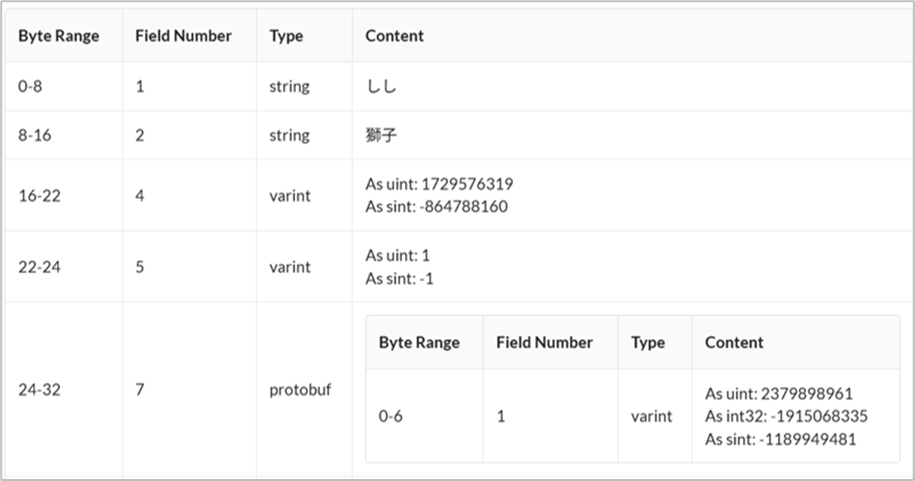
The input text records and the timestamp of entry are stored in the history.db file located under the /.mozc directory. Within this file, both the input text and the corresponding input timestamp are stored in an encrypted Protocol Buffer format.
Wnn Keyboard Lab
Wnn Keyboard Lab is a keyboard app installed on many Android devices manufactured by Japanese vendors. It stores input records using the OpenWnn structure, an open-source input framework developed by Japanese manufacturer Omron.
Text input records are stored in njuserl.a and njuserw.a files under the /files/discet/master directory.
OpenWnn
OpenWnn is an open-source Japanese input method editor developed by Omron. It provides core functions required for Japanese text input, including romaji input, kana conversion, kanji candidate prediction, and user dictionary-based learning.
Samsung Keyboard
Samsung Keyboard is the default keyboard app preinstalled on Samsung mobile devices. Similar to Wnn Keyboard Lab, Samsung Keyboard uses the OpenWnn structure, resulting in a similar data storage format. Japanese text input records are stored in njuserl.a and njuserl_uniq.a files under the /app_omrondb/dicset/master directory.
Simeji Keyboard
Simeji Keyboard is a third-party keyboard app that supports a wide range of emojis and theme customization features. Text input records are stored in the following locations.
-
/database
-
/file/dat
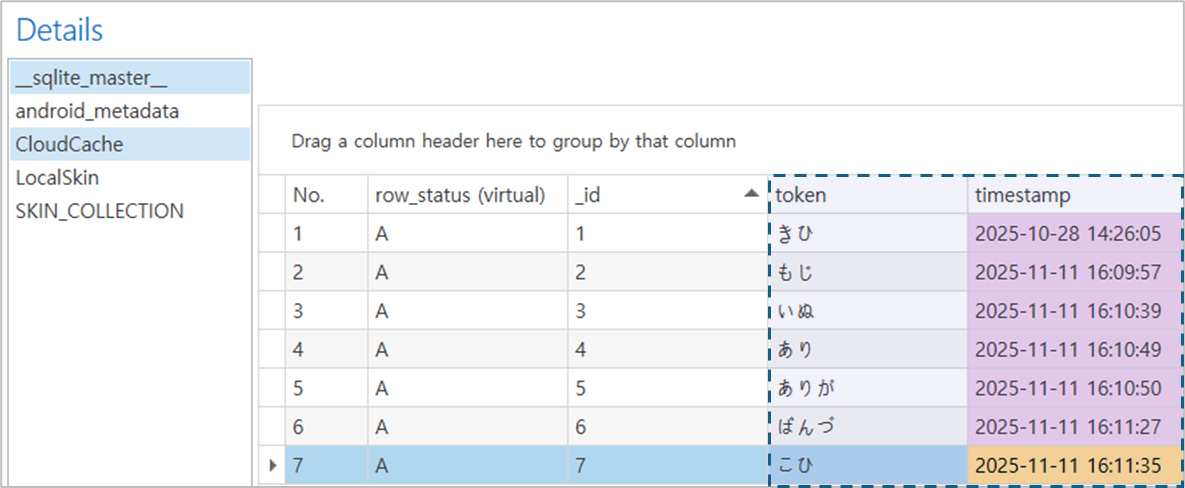
Text input content and the timestamp of the last input can be identified in the SimejiProvider.db file located under the /database directory.
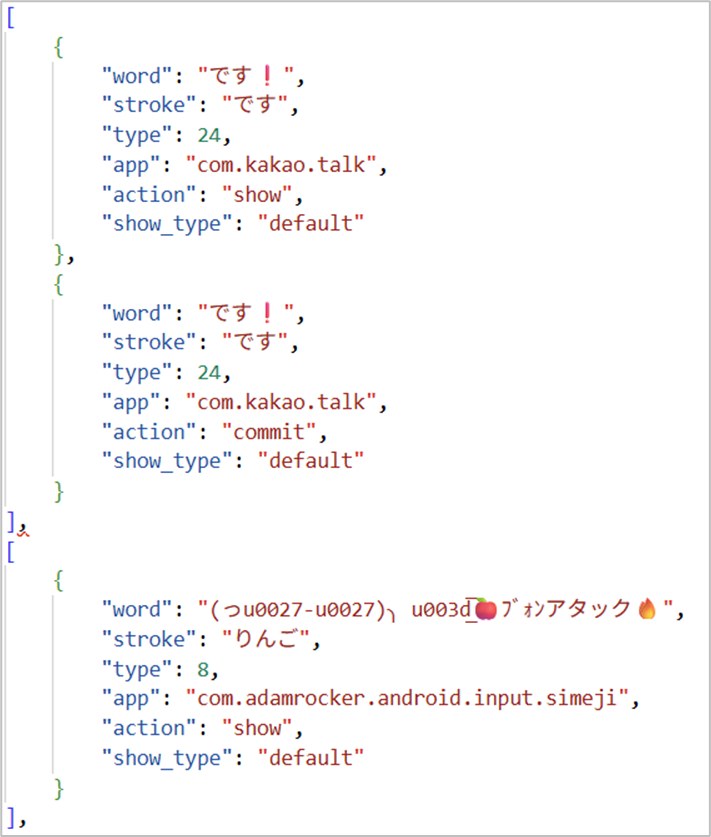
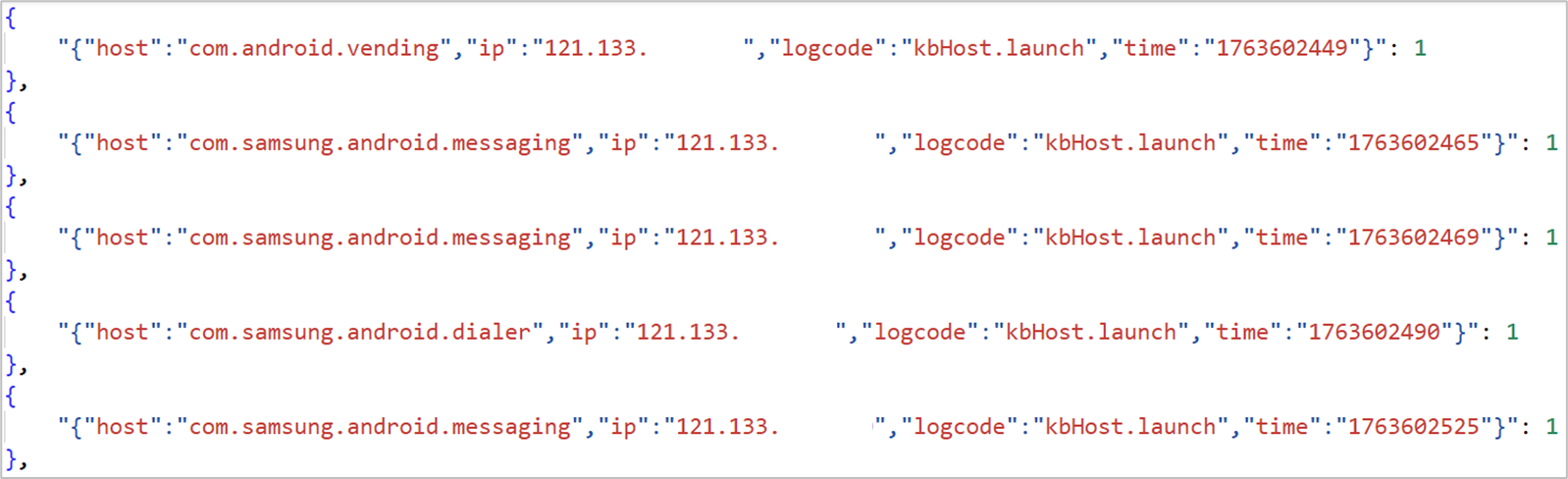
In addition, plaintext records of input text and the package name of the application in which the text was entered are stored in the fcloud.dat file under the /files/dat directory. The dad_info.dat file, stored in the same path, records the time at which a text input field was displayed. These records may be created even when no text is entered, as long as a keyboard appears on the screen.
The following table summarizes the information above.
| File path | File | Available Information |
|---|---|---|
| /databases | SimejiProvider.db |
|
| /files/dat | fcloud.dat |
|
| dad_info.dat |
|
2.1 iOS
Default Keyboard
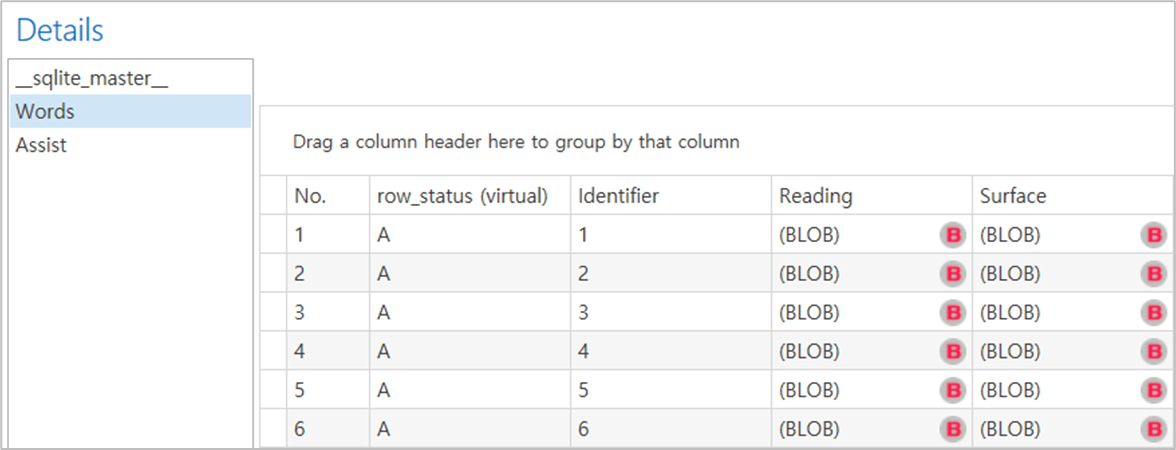
For the default keyboard built into the iPhone, keyboard input records are stored in plaintext in the following files under the /private/var/Mobile/Library/Keyboard directory.
-
LexicalLearning_ja_JP.db
-
DynamicPhraseLexicon_ja_JP.db
Biome
The Biome directory is known to store system logs such as user activity data, device usage information, application execution records, and Siri-related events. Text input records on iOS devices are also stored under the /private/var/mobile/Library/Biome.
Under the /restricted/Keyboard.TokenFrequency/local directory, numerically named file contains records saved by session. These data are serialized and stored in SEGB format.
Under the /public/TextInputSession/local directory, numerically named file stores keyboard usage logs, and the application package name. These data are serialized in SEGB format.
SEGB
SEGB is a proprietary binary storage format used by iOS to record user actions and system events. This format is primarily observed within the Biome directories on iOS devices.
Records by language
Input records for other languages are also stored in separate databases organized by language in the private/var/Mobile/Library/Keyboard directory. These databases contain word input records and last converted timestamp. The internal database structure remains consistent across all languages.
2.3 Available Information by Keyboard App
| App | Save Path | File | Available Information | |
|---|---|---|---|---|
| Android | Gboard | /.mozc | history.db |
|
| Wnn Keyboard Lab | /files/dicset/master | • njuserl.a • njuserw.a |
|
|
| Samsung Keyboard | /app_omrondb/dicset/master | • njuserl.a • njuserl_uniq.a |
|
|
| Simeji Keyboard | /database | SimejiProvider.db |
|
|
| /files/dat | fcloud.dat |
|
||
| dad_info.dat |
|
|||
| iOS | Default Keyboard | /private/var/Mobile/Library/Keyboard | • LexicalLearning_ja_JP.db • DynamicPhraseLexicon_ja_JP.db |
|
| Biome | /restricted/Keyboard.TokenFrequency/loca | Numerically named file |
|
|
| /public/TextInputSession/local | Numerically named file |
|
3.Summary
-
-
Text entered on a mobile device can be stored and managed by keyboard apps to improve features such as auto-completion and data learning.
-
Japanese users typically input romaji or hiragana first, then convert it to katakana or kanji to finalize their text entry.
-
The Android Gboard app stores text input records and the timestamp of the last text entry in the history.db file located at /.mozc.
-
The Android Wnn Keyboard Lab app stores text input records using the OpenWnn structure. These records are saved in the njuserl.a and njuserw.a files at /files/dicset/master.
-
The Android Samsung Keyboard app stores text input records in the njuserl.a and njuserl_uniq.a files at /app_omrondb/dicset/master.
-
The Android Simeji Keyboard app stores text input records and the timestamp of the last text entry in the SimejiProvider.db file at /database. Additionally, the fcloud.dat and dad_info.dat files in /files/dat store text input records, suggested words, the package names of apps in which text was entered, and the timestamp when the keyboard was displayed on screen.
-
The iOS default keyboard app stores text input records at /private/var/Mobile/Library/Keyboard.
-
The iOS default keyboard app stores text input history, keyboard usage logs, and the package names of apps where text was entered at /private/var/mobile/Library/Biome.
-