MD-RED v.3.6.2_SecureMessengers Release Highlight
MD-NEXT v.1.89.3_Checkm8FFS Release Highlight
MD-NEXT v.1.89.1_Bootloaderpro Release Highlight
MD-NEXT v.1.88.0_ADBPro4_5 Release Highlight
How to acquire cloud data with MD-CLOUD
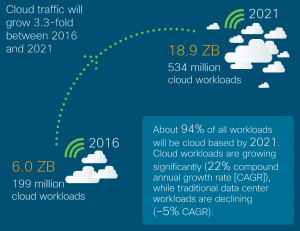
‘175 Zettabytes’, this is the number of data IDC estimates will be generated annually by 2025, and among those numbers, the cloud traffic is expected to grow and reach ‘18.9 Zettabytes’ by 2021.
This tremendous amount of cloud data is generated and fueled in the course of building driver assistance and autonomous vehicle technologies, IoT devices including sensors in our bodies, homes, factories, and cities, creating high-resolution content for 360 video and augmented reality and 5G communications globally.
As many digital forensic investigators are facing so-called ‘digital transformation’, finding evidence data from various cloud services is a highly demanding and important mission for digital forensic investigators. Cloud forensics is no more optional but an essential solution since many law enforcement professionals work on the cases with devices with deleted data, which needs further investigation on the backup data. Plus, there is tremendous growing number of smartphones, IoT devices, automobile and many more smart things which stores the whole data only stored in cloud services.
This article is to introduce cloud forensic solution of GMDSOFT, a step by step guide about data extraction and data view using MD-CLOUD. Various cloud and email services are supported, and data stored in social networking services such as Twitter, Facebook, Tumblr can be extracted by MD-CLOUD.
MD-CLOUD Overview
Product Highlights– Supports extraction from global cloud services such as Google and iCloud – Supports extraction of Cloud-based IoT device data – Supports extraction from cloud services based in East Asia, such as Baidu and Naver Cloud – Authenticates via ID and password, two-factor authentication, Captcha, and token credential information found locally on smartphone images, such as iOS Keychain – Includes automated web scraping tool for recursively capturing public webpages – Provides automatic evidence-tagging feature for intuitive searching – Natively integrates with MD-RED
Key FeaturesSupports a wide variety of cloud services Google, iCloud, Samsung Cloud, Naver Cloud, Evernote, One Drive, Baidu Supports email extraction POP3 and IMAP, as well as specific support for Gmail and Naver Mail Supports extraction from social media services Current support for Twitter and Tumblr, with Facebook support under active development Specializes in East Asian cloud services Baidu Cloud in China Naver Cloud in South Korea Acquisition of cloud-based IoT device data IoT data extraction from AI Speakers and Smart Home equipment Supports authentication via both public and unofficial APIs Supports various authentication methods ID and Password Captcha image tests Two-Factor Authentication messages Credential data pulled from smartphone dump images (such as iOS Keychain) Provides automated web capture feature Automated web-crawler capable of recursively extracting from a target web page Real-time extraction progress monitoring Displays the progress of ongoing extraction jobs in real time, from zero to one hundred percent User-friendly interface Features a simple, intuitive, and effective user experience that warrants little training Native MD-RED integration Imports credential information found in suspect smartphone images that have been analyzed in MD-RED Intuitive ‘Evidence Tagging’ based search feature Automatically tags and categorizes data as it’s extracted from the cloud so that it can be quickly searched, grouped, and organized. Built-In data preview Supports previewing any selected image, video, document, web page, email, and many more Supports filtering by date range and file type Allows users to limit the results of their analysis only to the time period and file types relevant to their case Hash based data integrity assurance Guarantees the integrity of the evidence data through powerful hash algorithms such as MD5 and SHA256 Report generation Provides simple-yet-powerful report generation tool that supports both PDF and Excel formats Here comes also simple but useful guide on MD-CLOUD for those investigators who would like to maximize their digital forensic skills and be prepared for the cloud data Tsunami. |
1. Data extraction using ‘Credential information’
1-1 Create New Case
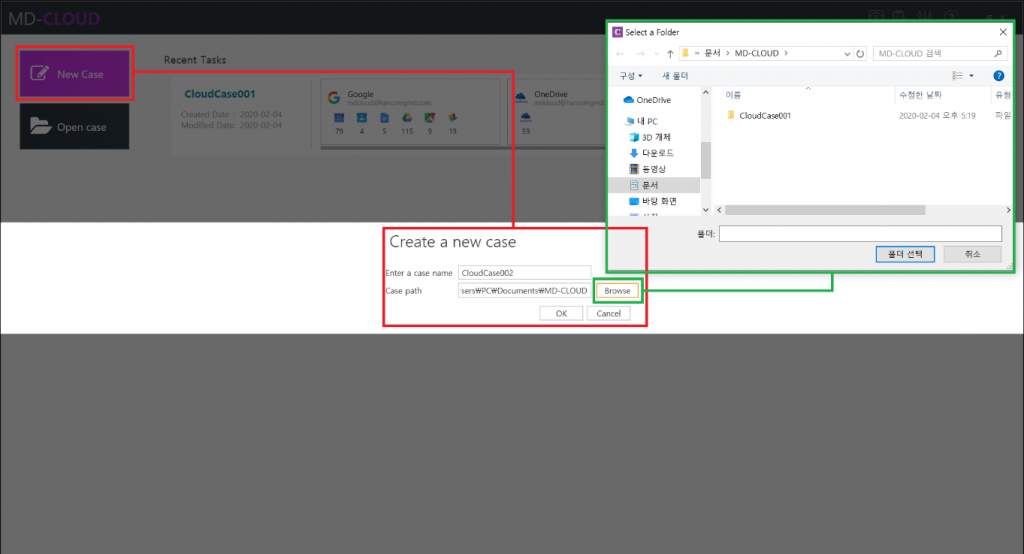
MD-CLOUD can access cloud services in several ways, specific services may ask the user to complete an additional verification process such as a Captcha entry or Two-factor authentication process. To start new cloud data acquisition, select ‘New Case’ and set the case name and its’ path. This time we’ll try accessing using credential information.
1-2 Select service and proceed the Data extraction
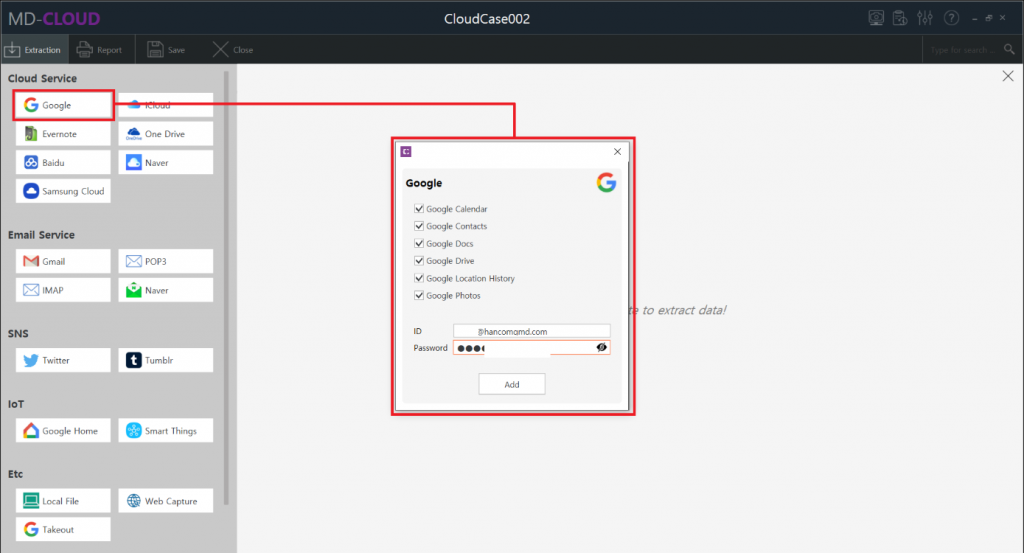
Various services such as Cloud, Email, SNS, IoT devices are supported by MD-CLOUD and those are displayed and categorized by types.
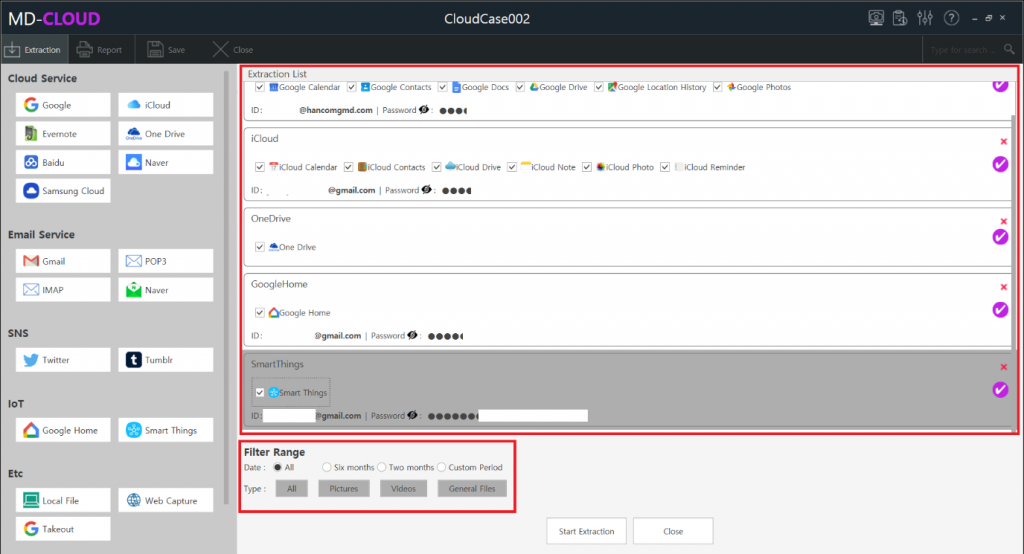
In this sample case we will try extracting data from Google. Select Google icon on the left side of the screen, and with the checkboxes user can perform selective data extraction. Date range and extraction type can be set before proceeding the extraction process, then the result data will be collected on the extraction filter conditions. Furthermore, even after the extraction is completed additional data sources can be added to the existing case without having to create a new case.
2. Data View: Contact/Event/Note/Email/SNS/Web Capture/Timeline Feed/Search View
2-1 Extraction Summary Dashboard
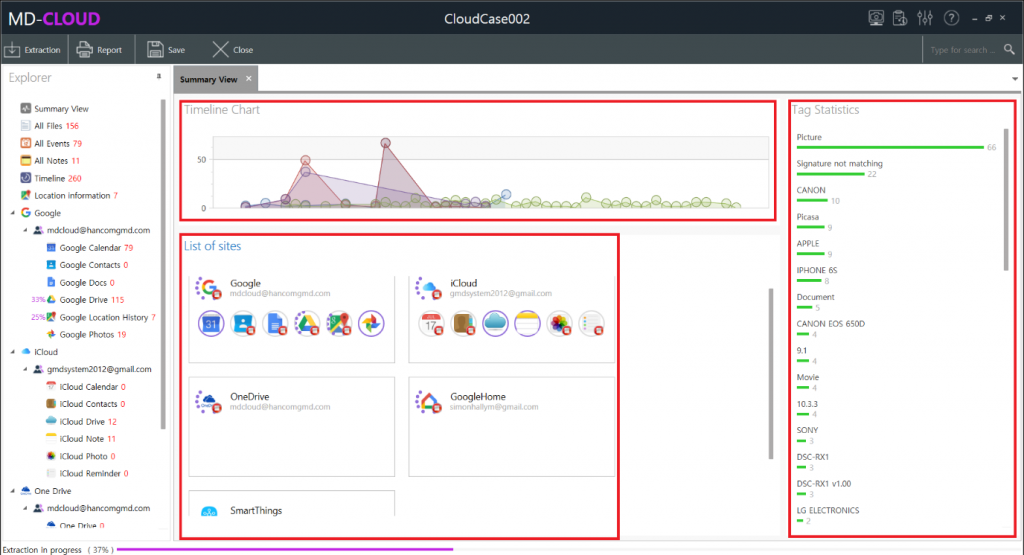
Once you start the extraction a Summary View will appear and display the progress of ongoing
extractions and some other miscellaneous information.
- Timeline Chart: Displays the amount of data that has been extracted so far relative to the dates associated with the extracted files (created/modified/uploaded time).
- Tag Statistics: MD-CLOUD automatically categorizes extracted files using tags that are generated through file metadata. The statistics of the tags are displayed here.
- List of Site: Summarizes the progress of extraction from data sources. It can be completely stopped by clicking on the stop icon.
2-2 Contact View
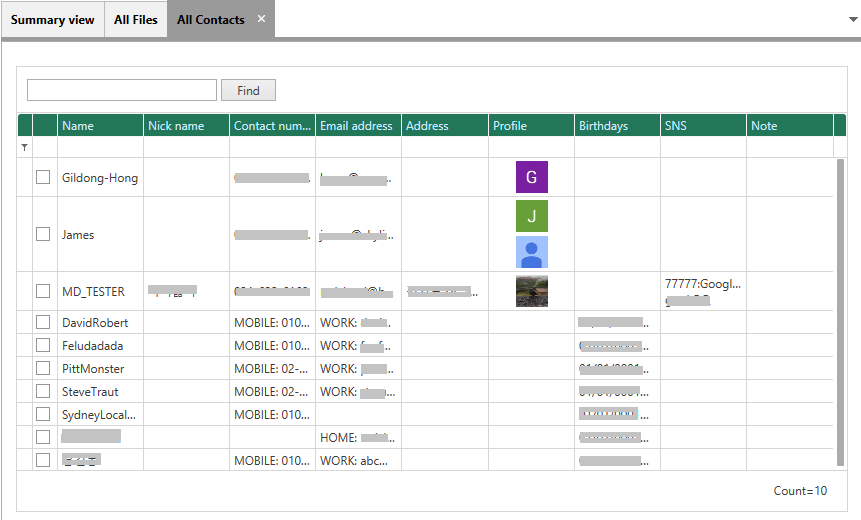
Displays contact information such as Contact Name, Nick Name, Contact Numbers, Email Address, Address, Profile, Birthdays, etc.
2-3 Event View
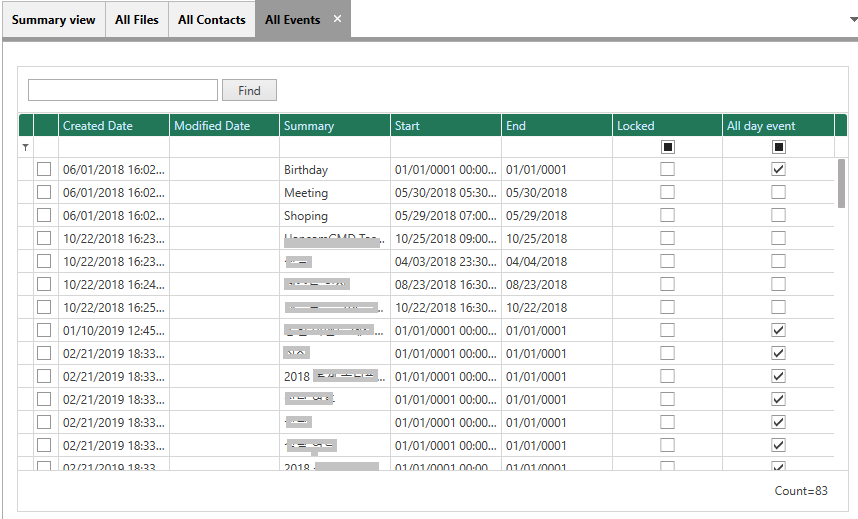
Event data such as Birthdays, Shopping, Meeting, Driving, Celebrations, Conference, Seminar, and other events.
2-4 Note View
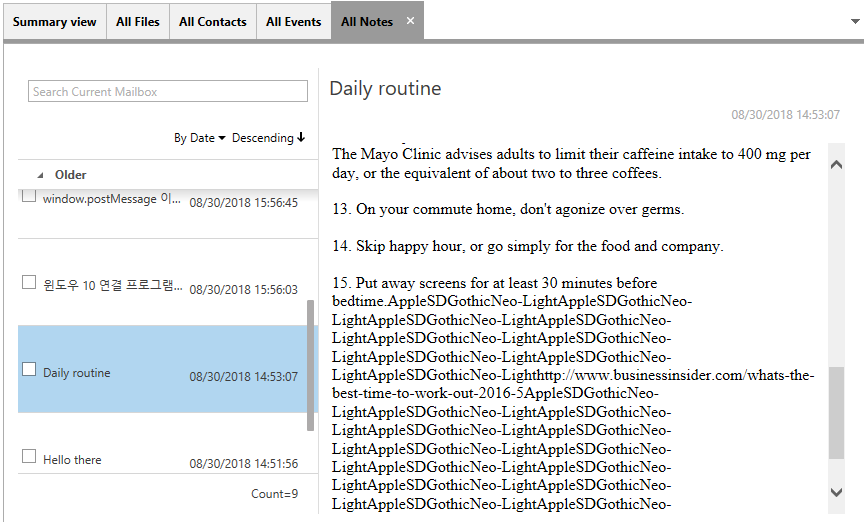
Displays notes collected from Cloud services such as iCloud Notes, Evernotes, etc.
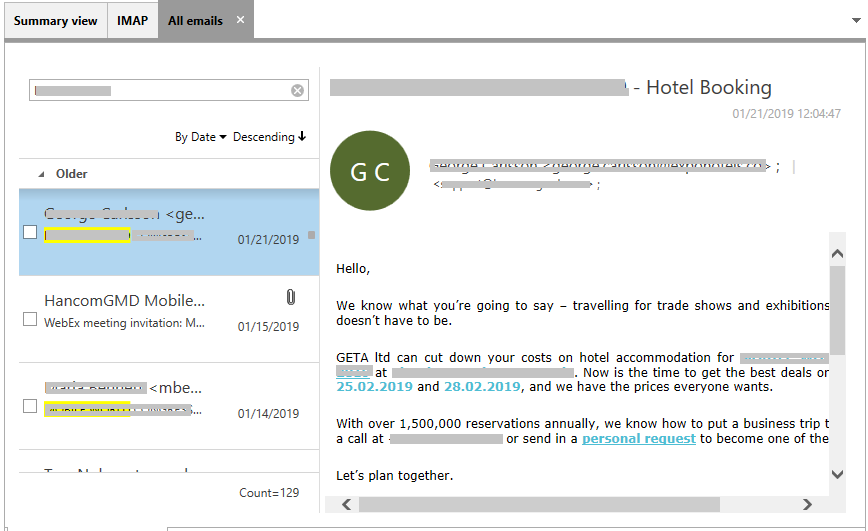
2-5 Email View
Email View allows users to apply to group and sort based on Date, Subject, From, Credential, etc. Email items can be searched by using the inline search box.
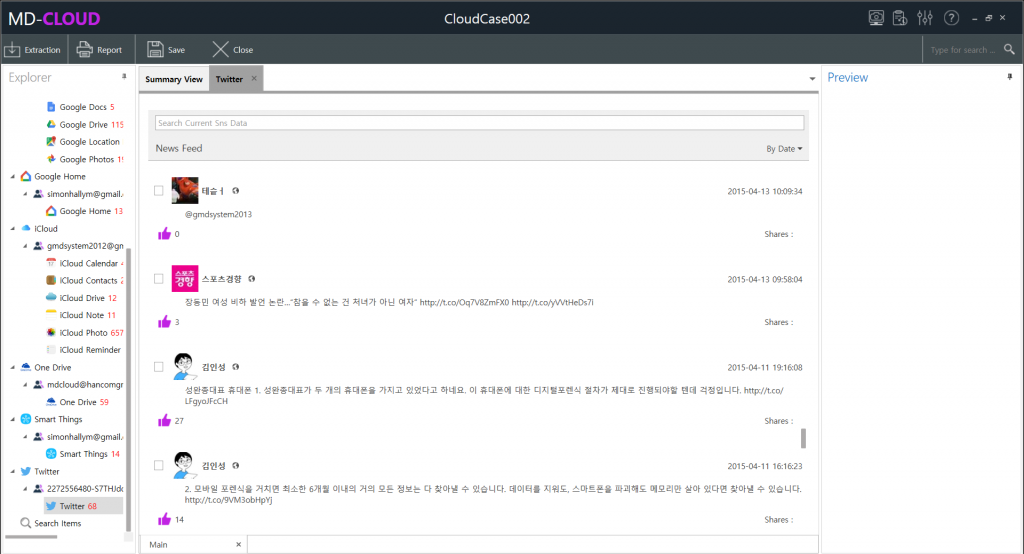
2-6 SNS View
Posts, multimedia, files and other information extracted from Social Network Services such as Twitter, Facebook, etc. are displayed here.
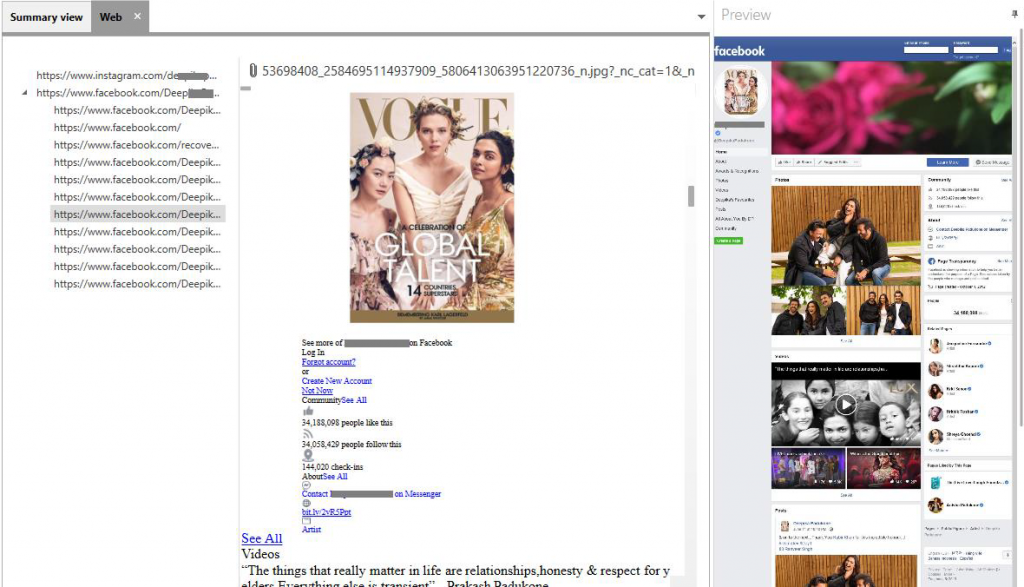
2-7 Web Capture View
Contents that have been extracted through data crawling on the provided links and their sublinks will be displayed in the Web (Web Capture) View. Multimedia, Posts and other public contents can be extracted from some sites like Facebook, Instagram, LinkedIn or any other webpages. It displays the below information.
- Link information: A list of extracted main links and their sub-links are displayed here.
- Content View: Displays the content of the selected link.
- Preview: Displays the overall look of the webpage.
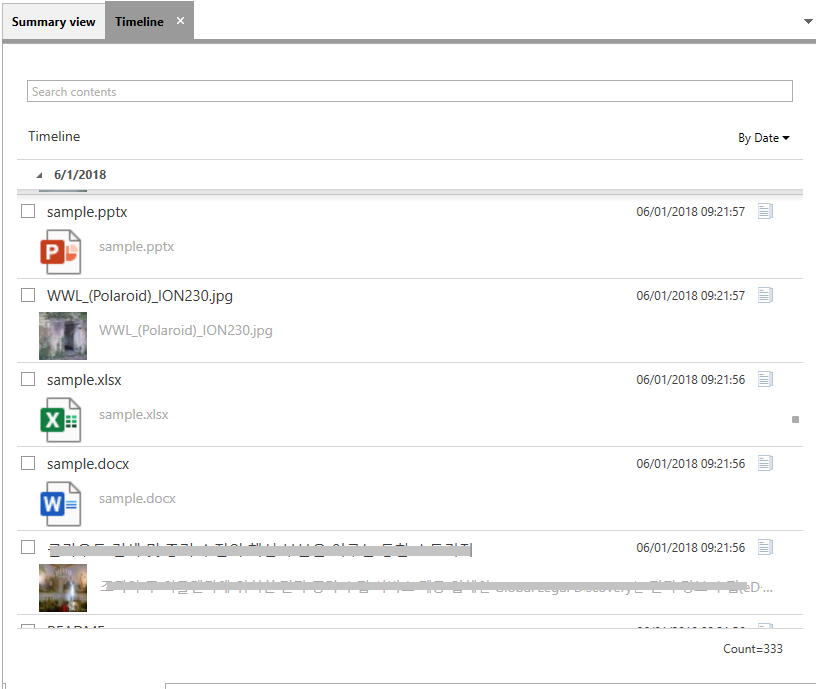
2-8 Timeline Feed View
Displays the data from every category and arranges them by the Date(Default), Subject, Content, Type or Credential.
2-9 Search View
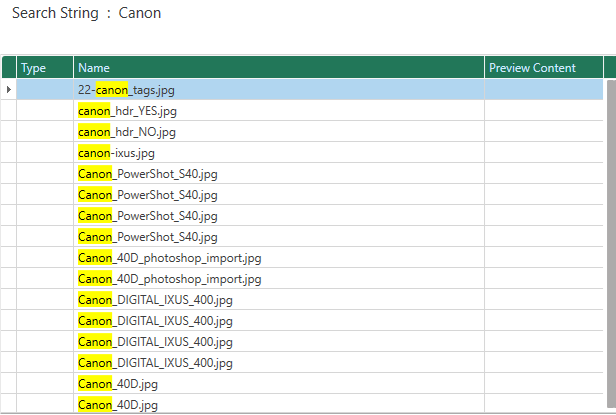
When searching keys from anywhere in the entire application, those search keys are maintained in the Search View. Double-clicking on the search key, you can see a list of the search results.
3. Generate Report: Case Info/Options/Layout
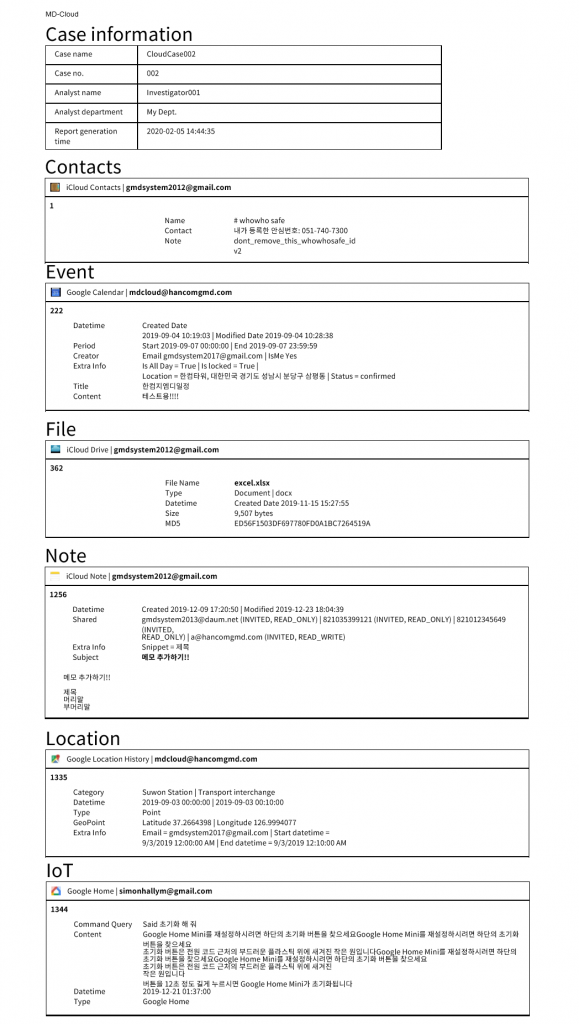
After the data extraction, user can generate a PDF report of that particular case which will display all the information of the extracted files and thumbnails of multimedia data. Below we have attached the screenshot of extraction report for Google Home.
The call for MD-CLOUD will gradually increase as it has great practical value and importance as a complimentary data acquisition tool that can investigate mobile data backup and new data stored only in cloud storage. Our effort to add various data extraction sources and product advancement on MD-CLOUD will continue.
If you are interested in cloud forensics and want to learn more about MD-CLOUD, please check the product specification from the below link and reach our team via sales@gmdsoft..com
GMDSOFT Video Recovery Solution ‘MD-VIDEO’
Rapidly growing needs of securing a safe environment, ‘Digital surveillance systems’ are everywhere. Hence, a significant number of new surveillance systems being installed each year, and the importance of acquiring data from these digital devices is being emphasized worldwide.
According to the recent article states that the number of surveillance videos recovered jumped 66% between 2017 and 2018. This proves and explains the video data is becoming critical more and more. Therefore, the solution to acquire these data complying with the digital forensic regulation shall give a great benefit to law enforcement.
To investigate the epic scale of digital video data, supporting various media format is one of the top priority features for video forensic solution to secure. MD-VIDEO supports video taken from the global manufacturers’ IP-CCTV, Car dashboard camera, Smartphone, Desktop, Camera, Camcorder, Drone and Wearable device. Moreover, various DVR manufacturer’s filesystem such as HikVision, Dahua, Zhiling, Samsung, Bosch, Honeywell, Sony, and Panasonic are supported.
We are excited to introduce our video recovery solution ‘MD-VIDEO’, check the below acquisition and recovery sequences of Car Dashboard Camera. If you are seeking for ease of use tool and have dramatically improved digital video investigation, MD-VIDEO is a proved successful choice!
I. Data Acquisition Sequence Method – Disk Image Recovery
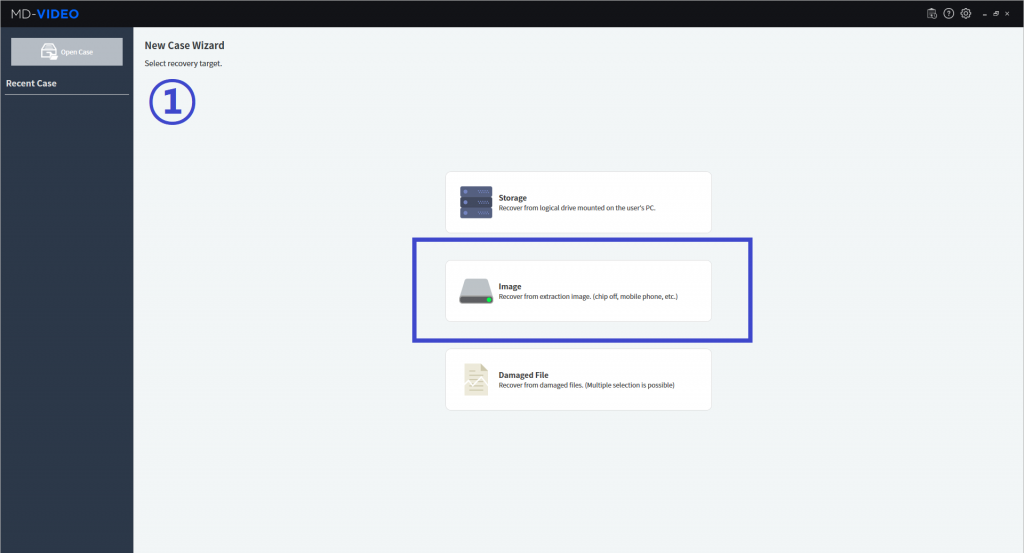
Step 1 Recovery Method Selection
You can select the recovery target among three options, Storage, Image and Damaged file. We will select ‘Image’ option to recover video data from acquired disk image. GMDSOFT
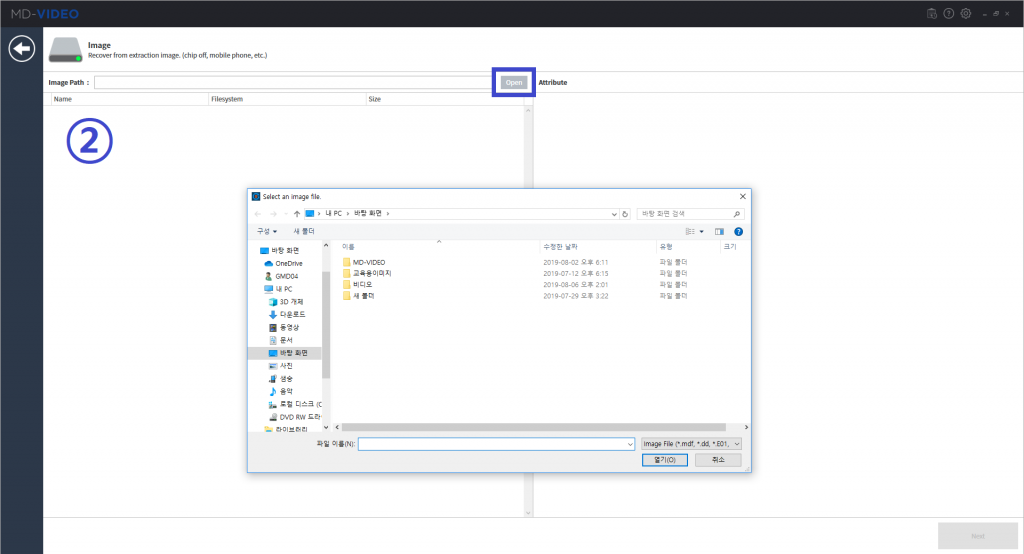
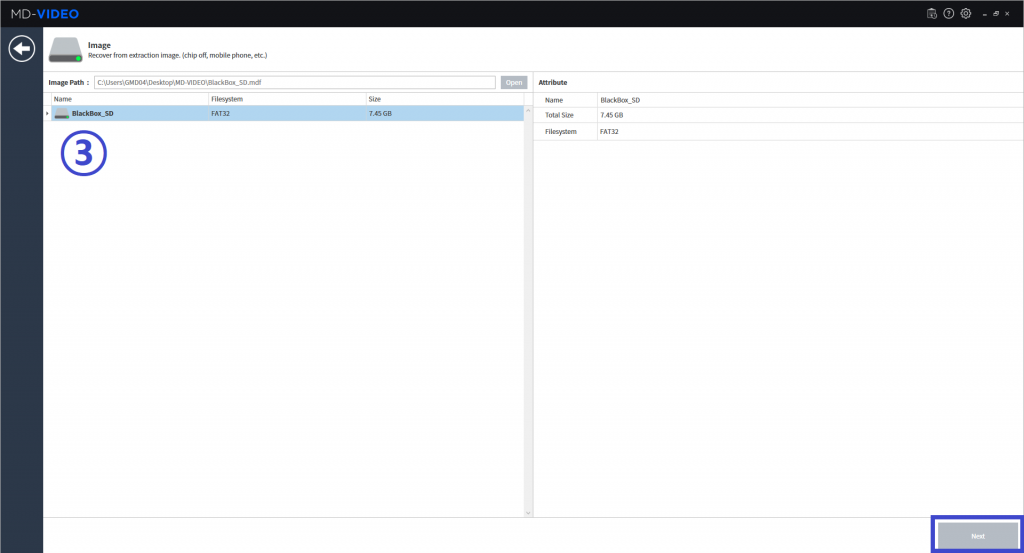
Step 2 Importing Image file
You’ll get to the Directory exploring screen. If you click ‘Open’ button, the target image file will be shown based on the extension type such as mdf, bin and E01.
Once the image file is selected, a name, size and file system for the image file will be identified in the attribute tab.
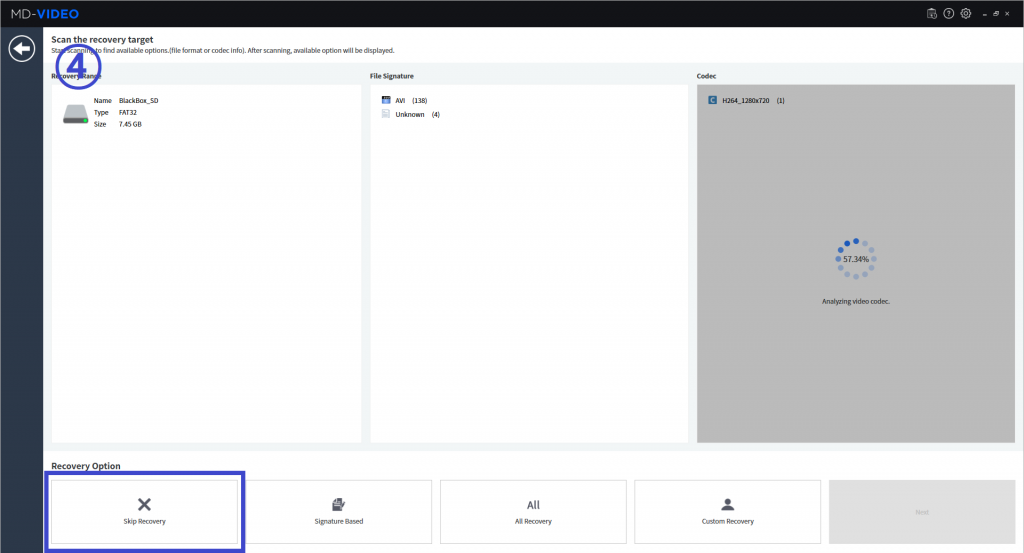
Step 3 Recovery Option Selection
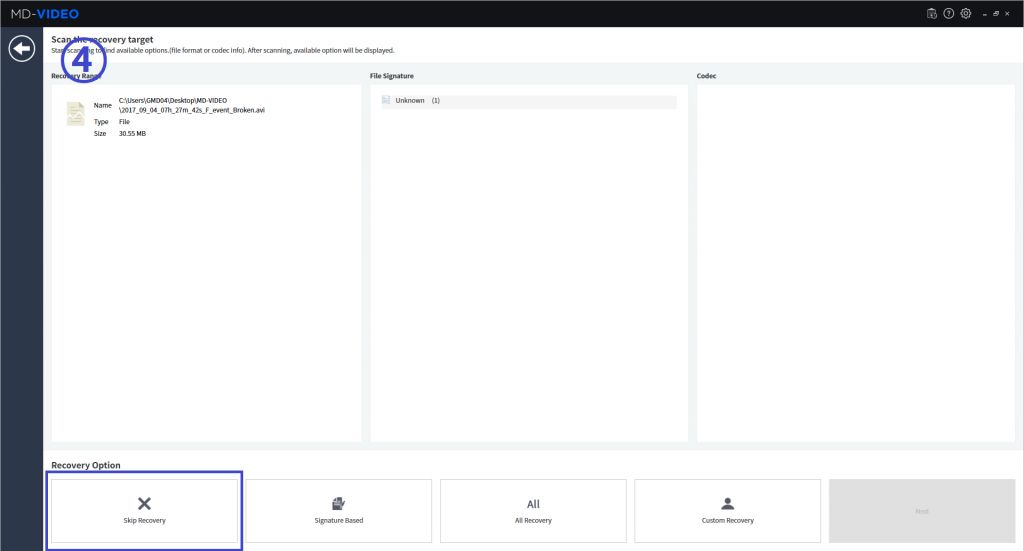
MD-VIDEO will show you the file signature and codec which are identified from the filesystem. If the file or codec is not recognized, it’ll be labelled as ‘Unknown’. On this sequence we will select ‘Skip Recovery’ option.
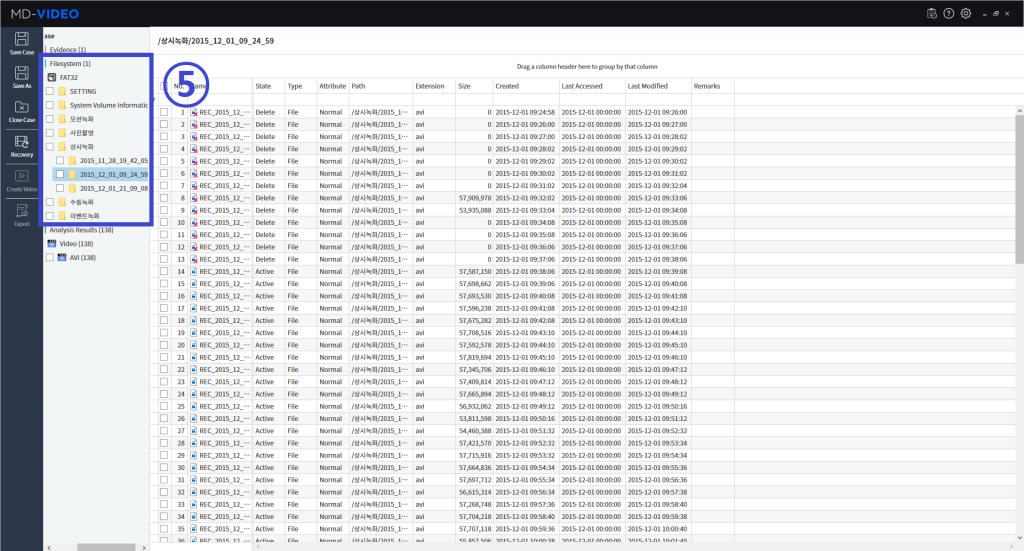
Step 4 Filesystem / Media Exploring
You can access the directory of disk images through ‘Filesystem’ and check the file status via ‘File viewer’.
The Audio and Video speed can be controlled and Viewer size can be adjusted.
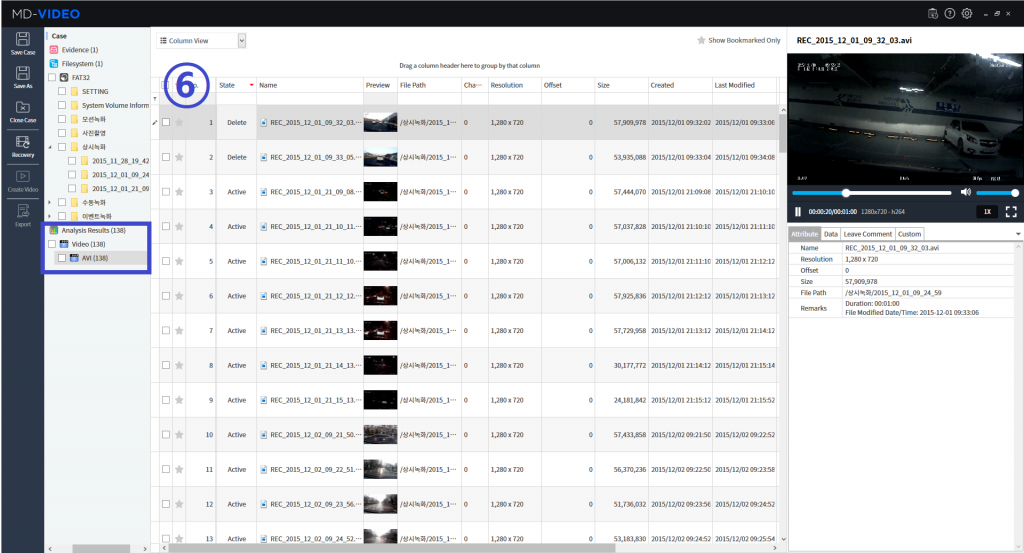
In ‘Analysis Results’ section, you can see recognized video files by format. You can select all of the sorted video files or individually.
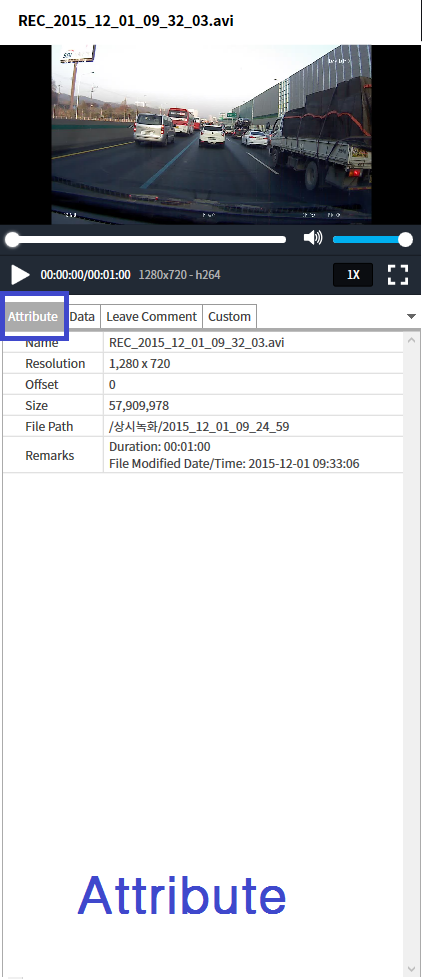
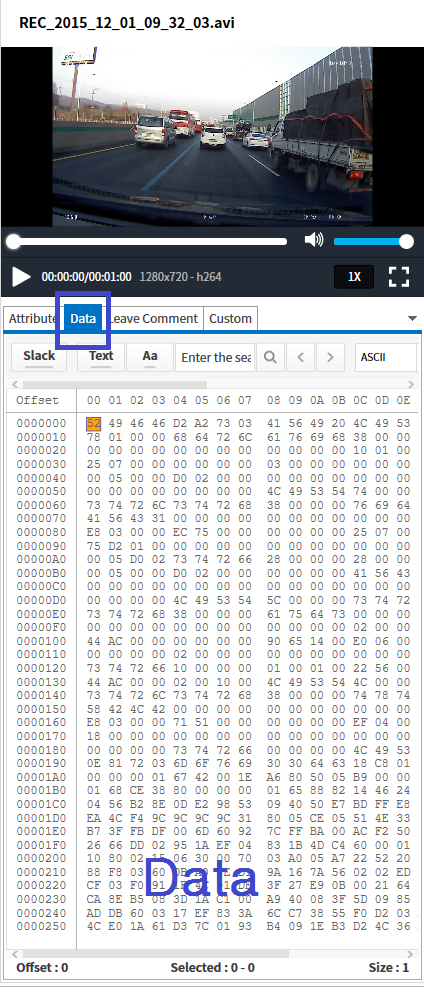
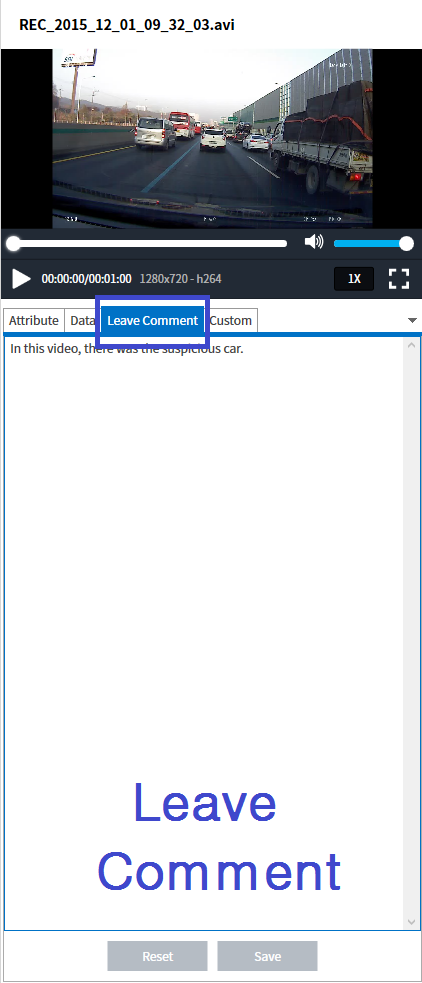
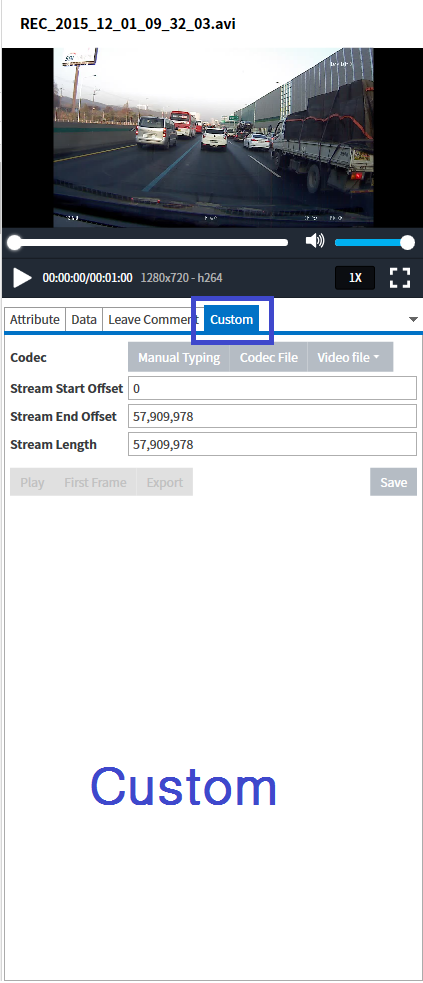
Also, in the media viewer section, there is several tabs that helps user to recognize file specifications such as “Attribute”, “Data”, “Leave Comments” and “Custom”. On the “Attribute”, there is file information and file hex value appears on the “Data” tab. Also, user can easily leave comment to log description for the file. On top of that, custom codec can be imported on the “Custom” tab.
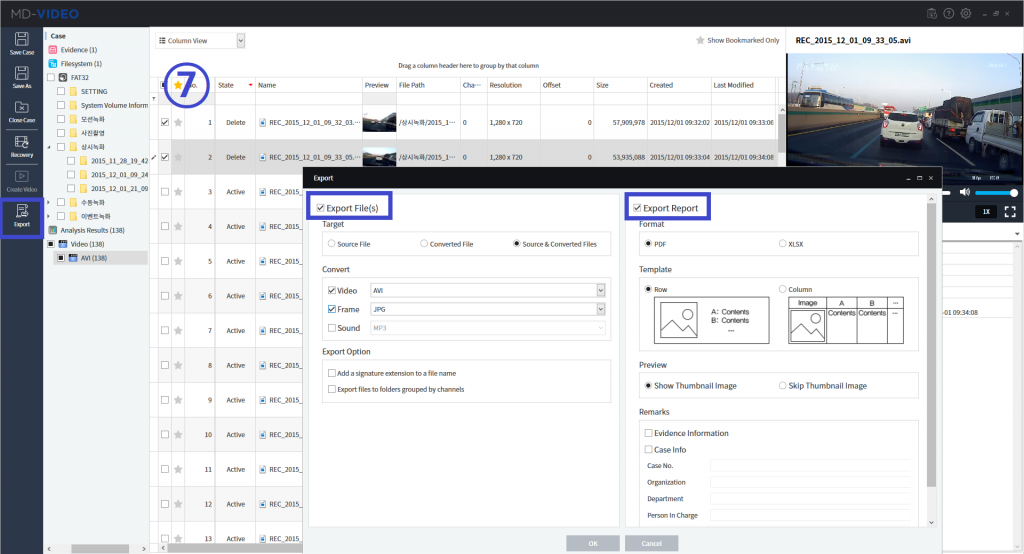
Step 5 Export File and Report
Also, there are ‘Export function.’ With this function, there are 2 ways to exporting. One is ‘Export File’ to export the file from the filesystem to the location set by user. It will also provide converting function as you can see in the figure. The other one is ‘Export Report’ to make report as PDF or XLSX format for guaranteeing integrity as evidence. Also, you can decide how to design the report. We choose the default way to export report.
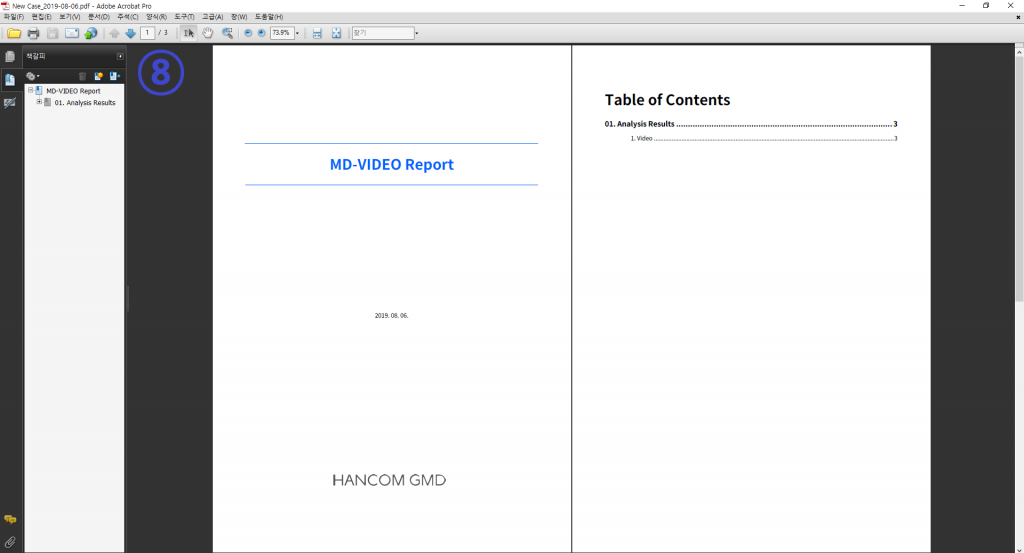
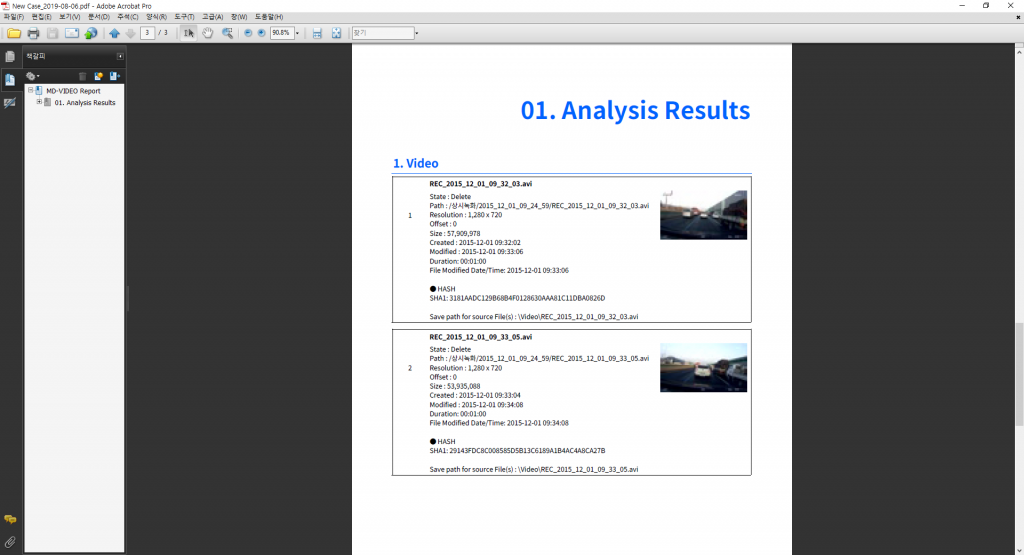
The result is shown in figure. Firstly, MD-VIDEO will make cover page of report. Secondly, there will be the table of contents of report. As last, it will show about the video which we analyze in MD-VIDEO. Each video have the hash values to guarantee these video have integrity
2 . Data Acquisition Sequence Method – Damaged Video File
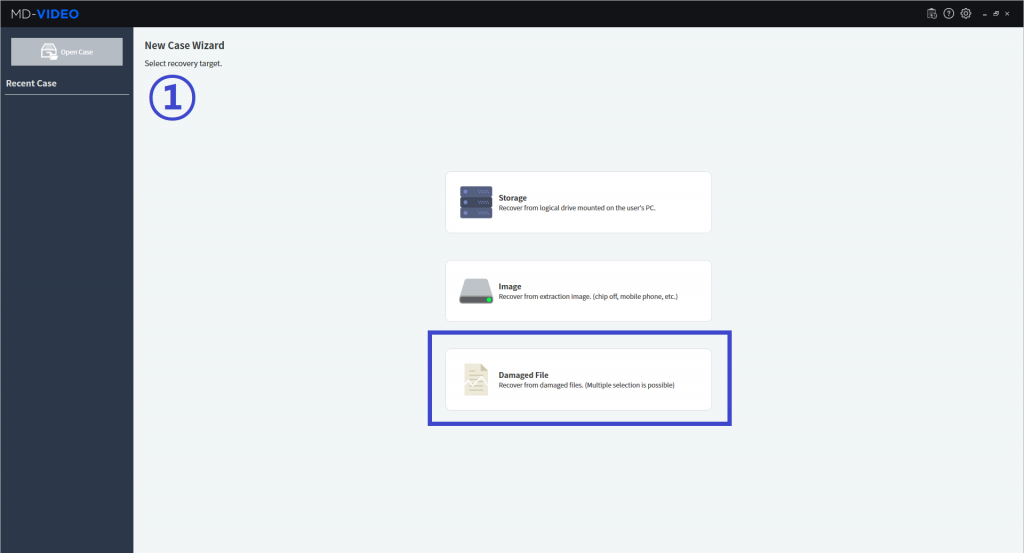
Step 1 Recovery Method Selection
To recover video data from damaged file, you can select third option ‘Damaged File’.
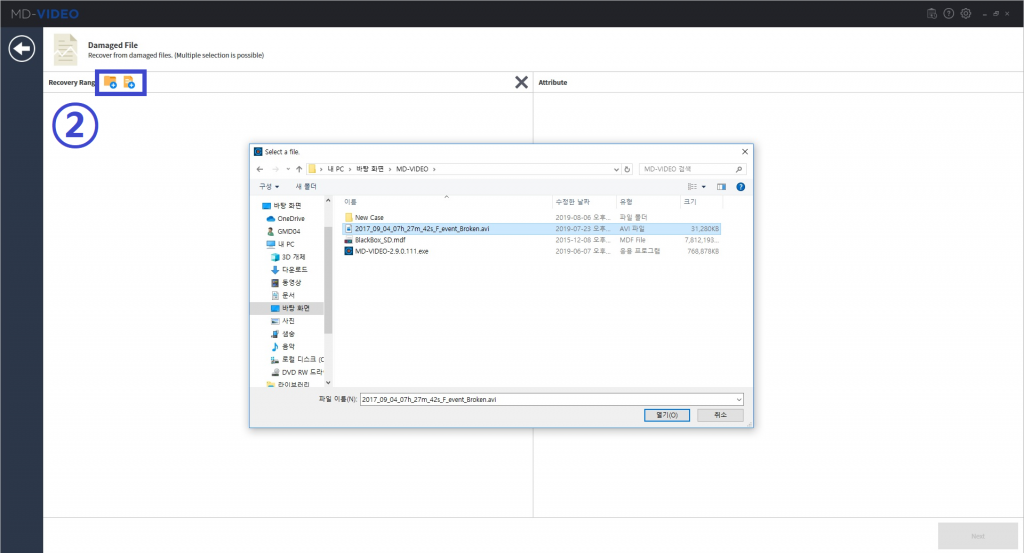
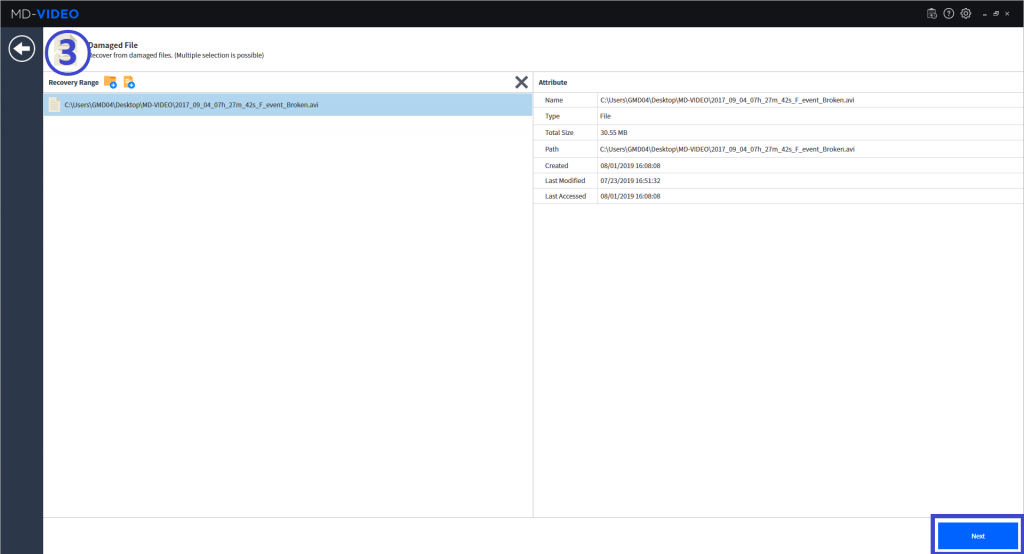
Step 2 Importing damaged file
With those buttons, you can put files or folders to recover the video from. We put a damaged file named ‘2017_09_04_07h_27m_42s_F_event_Broken.avi.’
Step 3 Recovery Option Selection
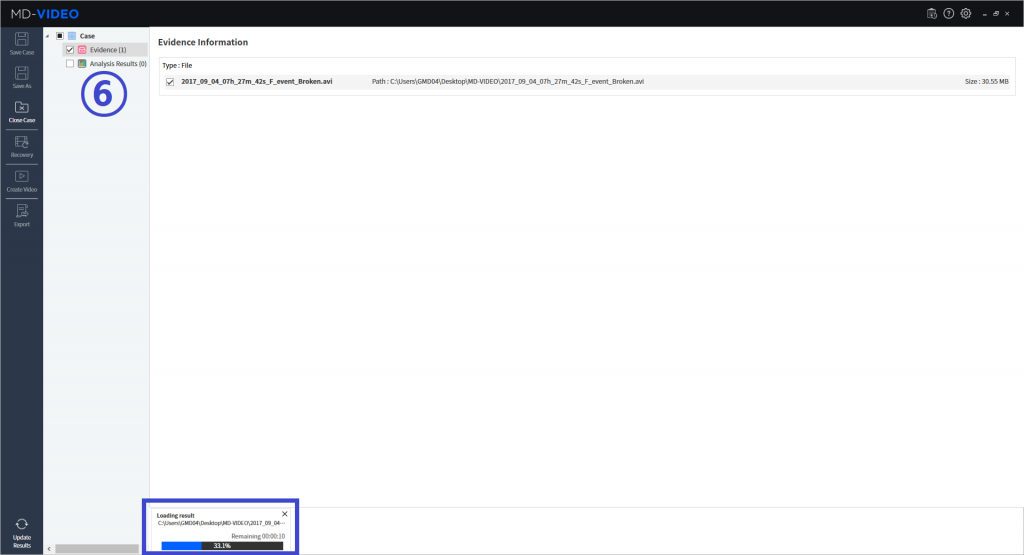
Once you put a file, MD-VIDEO will automatically scan the file and show these results, file signature and codec in the file. Due to the file is damaged, there was no file signature and codec identified from this file. To see ‘frame recovery function,’ we will skip recovery in this process.
Step 4 Recovery with frames
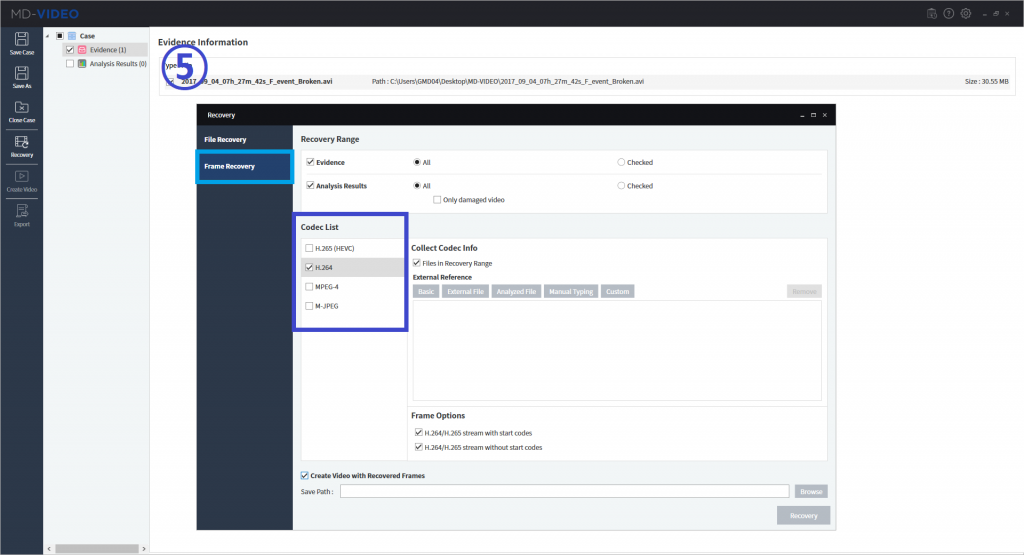
So, the damaged video will be recovered by MD-VIDEO’s frame recovery function. To recover with frame, select the files which need recovery and have to click “Recovery” button on the left side. After option screen pops up, you can select ‘Frame Recovery’ menu. Also, to get precise recovery result, you have to know specific codec of video file. In this case, the codec was identified as ‘H.264’ based on other active video files’ codec.
After select codec, MD-VIDEO starts the frame recovery process
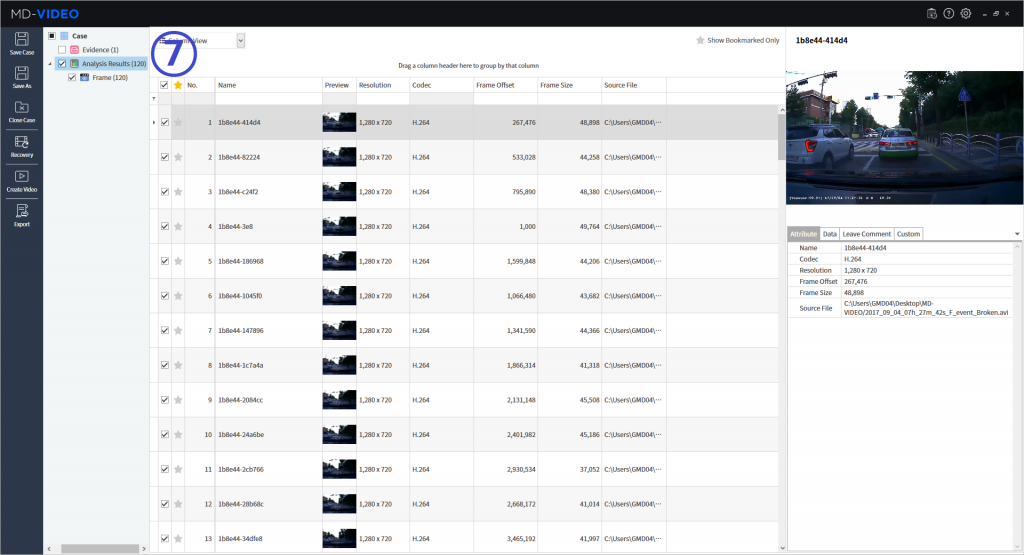
Step 5 Recovered Frames
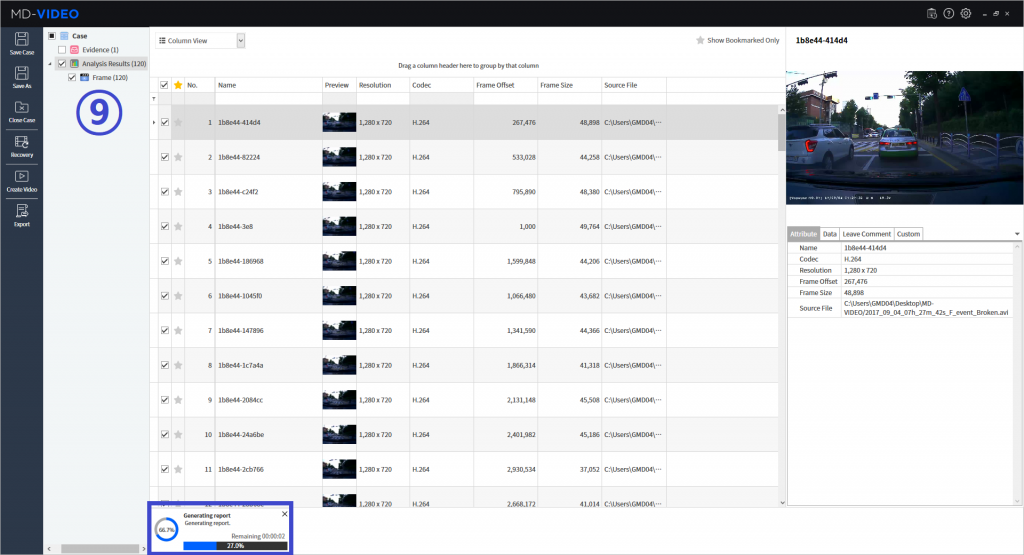
After ‘frame recovery’, list of recovered frames will appear as ‘Analysis Results. Based on the extracted frames appeared above, MD-VIDEO can recrate video.
Step 6 Export File and Report
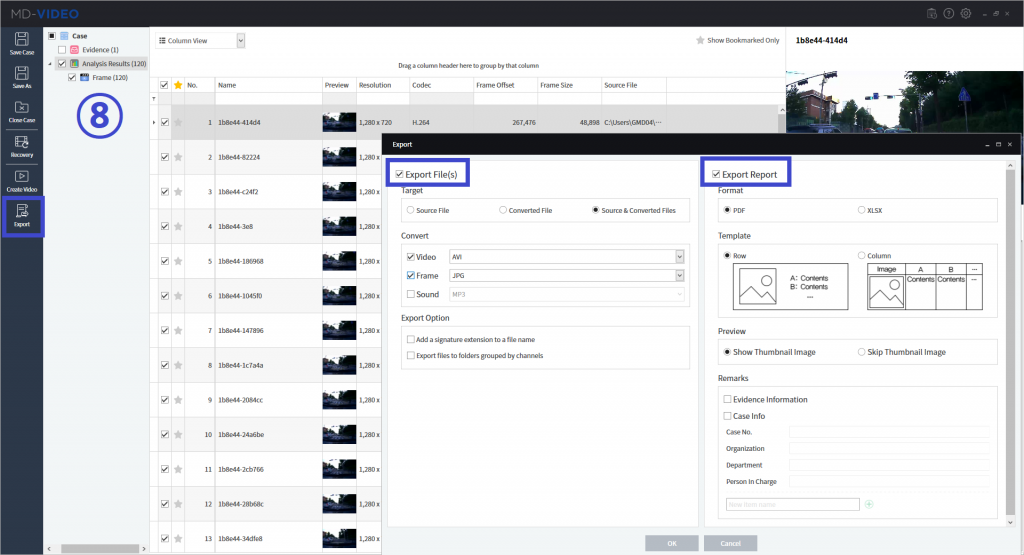
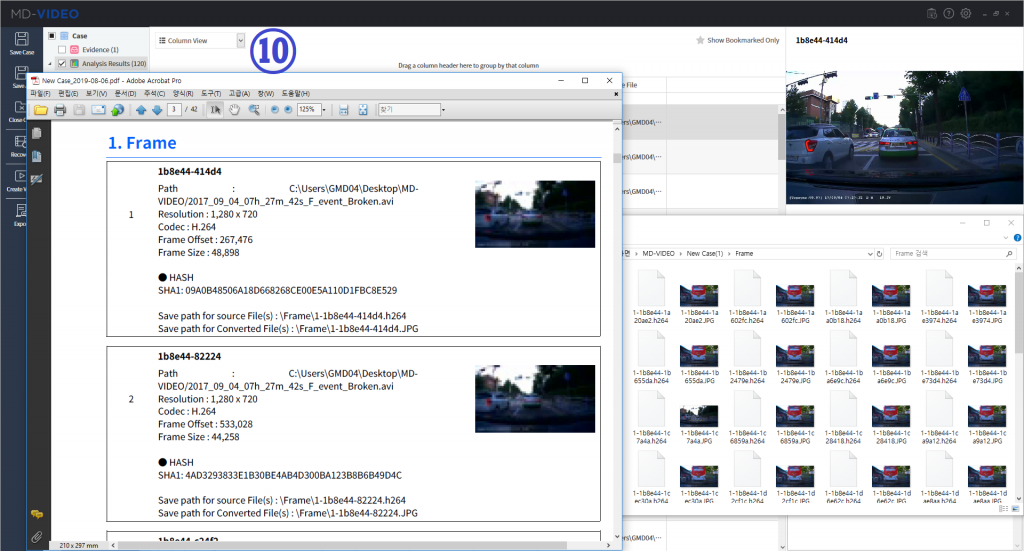
MD-NEXT has export function for both source-result files and report. With export function, you can convert recovered frames to video formats. Also, you can still export each of recovered frames to photo file, even for sound formats.
In case of report generation, the generated reports contain about the case and evidence information. For strong integrity, MD-NEXT calculates each of hash value for the extracted frames and the hash value data is also contained into the report.
Interview of GMDSOFT : Kim Hyun-soo(CEO)
1. Tell us a bit about your role: what does a day in your life look like?
I am Kim Hyun-soo, a founder of GMDSOFT.
Over the years, my daily routine is very focused on the sole purpose, making a perfect solution to empower digital investigations and how we can add more value to the mobile forensic market.
I start my day jumping right to my phone and check to see how things are going with the business. It’s always exciting to wake up and check on the progress of evidence commissioned by clients from overseas.
From the moment I get into the office, I spend a majority of time traveling for meetings with clients and chief executive officers in a HANCOM group, attend conferences, and other business-related gatherings each year.
HANCOM group is formed of fourteen companies, so if we have an active project going on, my schedule gets busier than it would normally.
Like many other CEOs, I wake up to emails and go bed to emails and being at home never means that I am off. It has never been easy to lead a company, but I love to take these responsibilities to grow a company and help society with empowering many investigators.
2. Tell us a little more about GMDSOFT, how your company was founded, and your mission/vision/values for your customers and the tools you’re building for them?
It was at a time when the mobile era was beginning to set in motion when I jumped into the mobile forensic market. I was a former computer technology developer specialized in programming and had a desire to run a company that can create added value with software technology.
We know there’s a variety of software applications and I think the value of software depends on where it’s applied. I’ve been looking for a new field where I can be more creative and create added value.
Since mobile was a hot topic at the moment, I took a turn toward mobile forensic technology research and development.
At that time, scientific research and technology development in mobile forensics were barely done in South Korea.
Thus, I visited the National Police, National Intelligence Service, and all the law enforcement agencies in person and explained the platform I am planning and conduct a demand survey. Confident of its potential as the positive response returned, I saw it as an excellent opportunity, and GMDSOFT, the mobile forensic research and development company was established in 1997. After joining with a HANCOM Group, we have a better solution for stable business management and synergy to expand fast in the global market.
I’m proud that GMDSOFT is the only mobile forensic company listed on KOSDAQ which opened a new market for mobile forensics in South Korea. As a result of the business with the national investigative agency from the beginning, the state agency now controls more than 80% of its major sales outlets.
We are confronting increasing intelligently evolving security threats, and many more challenges, GMDSOFT as a leading mobile forensic research group provides the solution when the national issue arises.
We also take part in a digital forensic investigation for audits and law firms. As such, the number of areas where the mobile forensic solution is applied is increasing in South Korea.
Also, for some rare occasions, we are asked to investigate smartphones from individuals to find digital evidence for their family or friends who already got in an accident, suicide, or other unjust cases. By discovering meaningful digital evidence for them, we realize once again that GMDSOFT is doing something beneficial and valuable job for our society.
GMDSOFT has a sole mission, which is ‘We provide the best solution to empower investigation.”
Hence, our teams comply with below two principles.
First, we take full responsibility for developing ‘creative technology.’
Our research team comes up with many creative and innovative ideas to provide a solution for our clients. Since the digital landscape is evolving rapidly and so too is digital forensics, our research teams are encouraged to apply new technologies and research on the latest digital forensic technology to empower investigation.
Second, all of our products and services are ‘customer oriented.’
GMDSOFT should satisfy customers’ demands and expectations. Our sales and technical support team regularly visit clients and receive their feedback and inquiry.
I think keeping good relationships and communication with customers and prompt response to their needs are the key elements to improve GMDSOFT.
3. Your company announced last month that it had been awarded the Outstanding International Collaboration in a Complex Digital Investigation. Congratulations!
Can you tell us a little about the award and your role in the case that caught the award committee’s attention?
The award is a special award for successfully solving a mobile forensic case commissioned by British police. It was a case where we had to get the evidence data from the suspect’s smartphone.
It was the latest smartphone model with secure boot setup, and the suspect was insisting that it was his child who set up the password while using it. Our research team was able to unlock secure boot successfully and helped to find evidence of its’ case with our tool MD-NEXT and MD-RED.
Your press release noted that this was the first time a Korean firm has been recognized at these awards. What does this recognition mean to you?
This event has an extraordinary meaning that our technology is highly recognized in the UK, a place of digital forensics. Moreover, it was only GMDSOFT who successfully provided a solution to this case within a week, while none of the mobile forensic companies were able to provide a solution for over months.
Moreover, GMDSOFT was the first Asian company to be awarded in ICDDF for successful cooperation with law enforcement in Europe, and it’s a massive help for us to carry out our business in a global market.
How did working with your customer on this case help you to improve your product(s)?
I think the conductivity level in digital forensic technology in the UK is one of the best in the world. It was also the UK where we, founders of CTO and I, had the first experience in mobile forensics.
By working closely with customers in the UK and receiving many inquiries and feedbacks from the frontline investigators, we believe our product MD-Series can be improved thoroughly and satisfy many investigators around the world.
Also, furthermore, we are applying new features and solutions rapidly to our product as we receive various inquiries from the UK with the issues on the latest technology such as drone, self-driving cars, smart TV and many more.
You’ve also secured contracts with the West Midlands Counter Terrorism Unit and Leicestershire Police for your MD-NEXT and MD-RED products.
How do you anticipate your experience, in this case, will help you partner with other customer agencies?
The success story of UK police was made after our product got through their product qualification process, which took about six months comparing data analysis from a few other mobile forensic tools on the real evidence phones. Especially, our products have shown the superior result in Asian smartphone extraction and diverse apps analysis to other competitors. This means our product can do an essential role as a complementary tool to verify the results from existing mobile forensic tools. This success story is spread by word of mouth, and we are having product demonstration inquiries from the other UK policies since then, now we are expecting to have more achievement in the UK and other European countries as well.
Can you give us any hints as to what else we might expect to see from HancomGMD this year?
This year we are highly focused on the mobile forensic market in the European region, including the UK and India. We have more business opportunities in these two regions.
We will support clients from these regions and develop our products, furthermore, we are looking forward to presenting our new product lines, which performs data acquisition and analysis on cloud services, data recovery tool for universal CCTV/DVR/Vehicle media and video analytics tool based on AI technology.
When you’re not working, what do you enjoy doing in your spare time?
I think staying highly innovative and focused on the market is essential.
Even though I no more work as a software developer, I am still fascinated with learning and developing skills that are related to new technology.
Whenever I am outside of work, I love browsing tech savvy’s blog, journal, and subscribe to the YouTube channel. It’s a highly recommended way to learn new things for those with minimal time.
In recent years, I have been spending most of my spare time thinking of a strategy to grow our new business in VR, drone, IoT, and AI technology. It’s a big challenge and fresh experience to put myself in a new field.
Lastly, our global business team and I spend much time and put effort to find cooperative partners or visionary investors overseas. We are kicking off 2019 with intensive global business strategies.
We are always welcoming anybody who would like to work with and to lead this mobile forensic market; Somebody like you who dream high and have a strong passion!
2017 Korea – Indonesia Cyber Security Business Meeting
GMDSOFT attended Information Security Business Meeting organized by KISA and KISIA and hosted by Ministry of Science and ICT from 3rd to 9th of Dec.
GMDSOFT’s solution, MD-Series received a lot of attention during the meeting especially from Malaysia. Most of all, it was a great achievement that GMDSOFT had an agreement ceremony with OG IT, the malaysian company of Forensic services.

MD-LIVE, New product for new trend of mobile forensics
GMDSOFT launched a New Product, MD-LIVE, the live data extraction and analysis solution to help investigators with collecting the investigative evidence on the spot promptly. Find out more about new features of MD-LIVE below.
MD-LIVE
MD-LIVE is a mobile live data forensics product with easy to use user interface and logical extraction and quick data analysis. It also supports decryption and recovery of the recently deleted SNS messages, automatic smartphone detection, smartphone display mirroring and capturing with camera to capture the evidence image or to record video at the field.
Product Highlights
1. Mobile forensic solution for on-the-spot investigation
2. Selective data acquisition by the specified time and application
3. Minimize work time with easy and simple step of use
4. Recording and capturing of smartphone screen
5. Smartphone-like intuitive and visualized analysis result
Key Features
1. Selected data extraction and analysis
– Only data related to the incident can be selected and analyzed
– Minimization of unnecessary data extraction to protect the privacy of the subject who is under investigation and reduce the time spent on the site
2. Assurance of evidence data integrity
– Hash calculation for ensuring the integrity of data and multimedia files used for analysis
3. Easy and concise process
– Intuitive user interface and smartphone model auto-detection function which enables smooth, on-the-spot forensics with minimal training
– Analysis GUI provision similar to actual smartphone
– Evidence data filtering and identification capabilities by providing themes similar to smartphone environments
4. Multimedia preview
– Images, videos, audios and documents preview in the smartphone
– Play any types of smartphone multimedia using embedded multimedia player regardless of the file format
5. Camera and Mirroring
– Smartphone screen mirroring and capturing can be used when data extraction or analysis is impossible
– Recording of the whole procedure with external camera for the chain of custody
6. Analysis report creation
– Report generation on selected evidence
– Summary of smartphone data, multimedia and application analysis result
– Recorded video or captured image of the screen can be included in the report with comments
– PDF file report and extracted data export (CD, DVD, USB)